January 15th, 2022
Temperature 26F/-3C
My Python Journey
I have been trying to learn a little bit of programing off and on for the last year or two. I found a book called "How to Think Like a Computer Scientist" that I am actually learning something from.
This Turtle Clock was not an easy thing to figure out, and I don't know if the coding I came up with is the best coding or not. I searched high and low on-line to find the answer to the Turtle Clock exercise but there simply were no answer out there on how to do it.
[IMAGE: https://files.peakd.com/file/peakd-hive/bashadow/23tSym8ijKKC8v3WYRJcZMSURgWJ9GxHHd6n3fwR9AkinFYdP2EmkfJhJnuPN4b7TYHD1.png]
** My code at the bottom of the post**
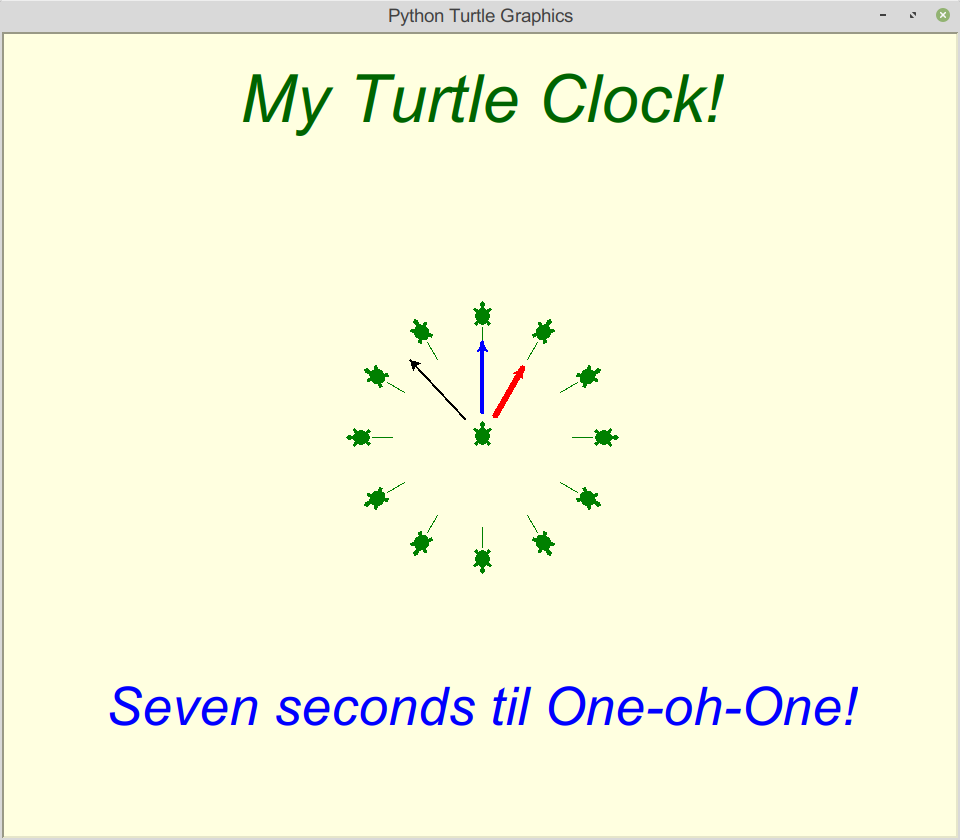
My first and second and a lot of other tries did not go well, but by continuing to try things I got it down. First try of the turtles making the clock face was inputting the same code basically 12 times. Once I had the clock face and it worked, I then used the for I in range() loop. So I only had to input the information sequence once making for a smaller number of code lines.
The book had zero information on how to add text to the Screen, (at least not in the first 3 chapters), I am only part way through chapter 4. A short search on-line did give me some methods to try and get text on the page where I wanted it.
I am going to try to keep the clock program going. I would like to make it work like a clock, not sure if I will be able to do that and make the Hour, Minute, and Second hands work. I did manage to figure out how many hours and minutes lesson/exercise so I think I understand how the modulus operator (%) works to get the remaining minutes. Perhaps one day in the future I will have my own private desktop working clock widget.
It has been fun trying to learn, it does take time, and I have been putting a little bit into it this past four days. That is why there has not been much commenting from me. I may not make the Engagement League top 100 list this coming Monday. I'll have to try and tear myself away from my self studies to try and let people know I am still around just distracted by Python.
It is slow progress, but steady. More than I had in the past. So I'm at chapter 4 - 4.1 Functions, It will take me a bit to get through it, I keep doing a brief review of what I supposedly learned, but some of it from chapters 1-3 still need to sink in.
That's my journey so far, perhaps by the end of the year I will be able to figure out how to pull things from the Hive API's.
If you know of other resources that help speed learning along please leave a note, also I am currently using Thonny IDE, (that is what came with the Raspberry Pi), it seems to be a good learning program, and is somewhat easy for me to use. Oh and i am doing all this while still trying to learn and figure out Linux Mint Cinnamon. the year is starting out rather interesting for me.
Tiny Picture links back to my blog:
That temperature up there is from Eleven PM Alaska time, pretty warm for this time of year.
```
import turtle
wn = turtle.Screen()
wn.bgcolor("lightyellow")
alex = turtle.Turtle()
alex.color('darkgreen')
alex.shape("turtle")
hourhand = turtle.Turtle()
hourhand.color("blue")
hourhand.hideturtle()
hourhand.pensize(4)
minhand = turtle.Turtle()
minhand.color("red")
minhand.hideturtle()
minhand.pensize(6)
sechand = turtle.Turtle()
sechand.color("black")
sechand.hideturtle()
sechand.pensize(2)
Move alex to the top of the page
alex.left(90)
alex.penup()
alex.forward(300)
Have alex write his message
style = ('Arial', 50, 'italic')
alex.write('My Turtle Clock!', font=style, align='center')
alex.hideturtle()
alex.home()
second message at bottom
alex.right(90)
alex.penup()
alex.forward(300)
alex.color("blue")
style = ('Arial', 40, 'italic')
alex.write('Seven seconds til One-oh-One!', font=style, align='center')
alex.hideturtle()
alex.home()
alex.color("green")
alex.left(90)
alex.stamp()
for I in range(12):
alex.penup()
alex.forward(90)
alex.pendown()
alex.forward(20)
alex.penup()
alex.forward(10)
alex.stamp()
alex.penup()
alex.left(180)
alex.forward(120)
alex.right(30)
alex.hideturtle()
hourhand.showturtle()
hourhand.left(90)
hourhand.penup()
hourhand.forward (25)
hourhand.pendown()
hourhand.forward(70)
minhand.showturtle()
minhand.left(60)
minhand.penup()
minhand.forward (25)
minhand.pendown()
minhand.forward(55)
sechand.showturtle()
sechand.left(133)
sechand.penup()
sechand.forward (25)
sechand.pendown()
sechand.forward(80)
wn.mainloop()
'``
