__________     __ __     __  _______    ________
  / ____/ __ \   / // /    / / / /  _/ |  / / ____/
 / / __/ / / /  / // /_   / /_/ // / | | / / __/
/ /_/ / /_/ /  /__  __/  / __  // /  | |/ / /___
\____/\____/     /_/    /_/ /_/___/  |___/_____/

 --- A GOPHER-LIKE INTERFACE FOR HIVE BLOCKCHAIN ---

Using Steemworld manual vote on comments

BY: @bashadow | CREATED: Jan. 26, 2018, 3:19 a.m. | VOTES: 12 | PAYOUT: $0.11 | [ VOTE ]

Here is how to use steemworld.org's manual vote tool for comments.

[IMAGE: https://steemitimages.com/DQmZxqD8rCo7ffCvYCphPC7nYAiBU2Ec9ZhHZQAapCbcnPL/Account%20Operations.png]
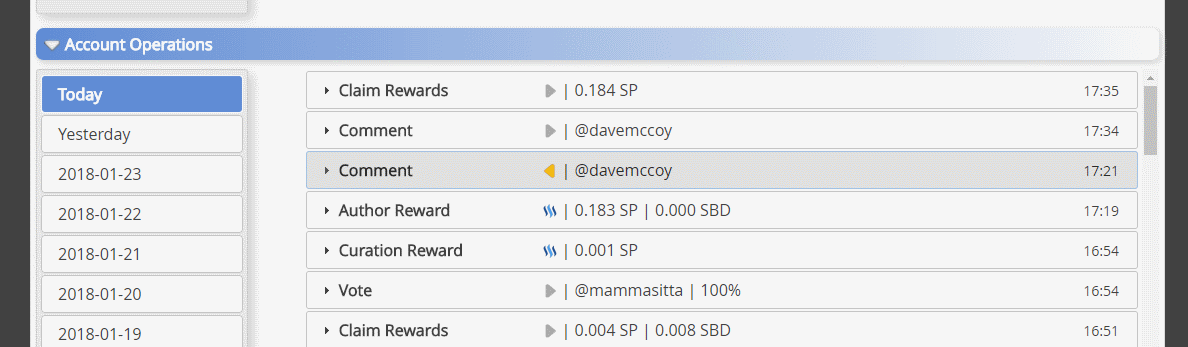
Expand the comment you want to vote for.
Then right click and copy the permalink
[IMAGE: https://steemitimages.com/DQmSxs5iXqHajku47QAbKhfTobZscDaveENBz6M75gKB7tc/expanded%20comment.png]
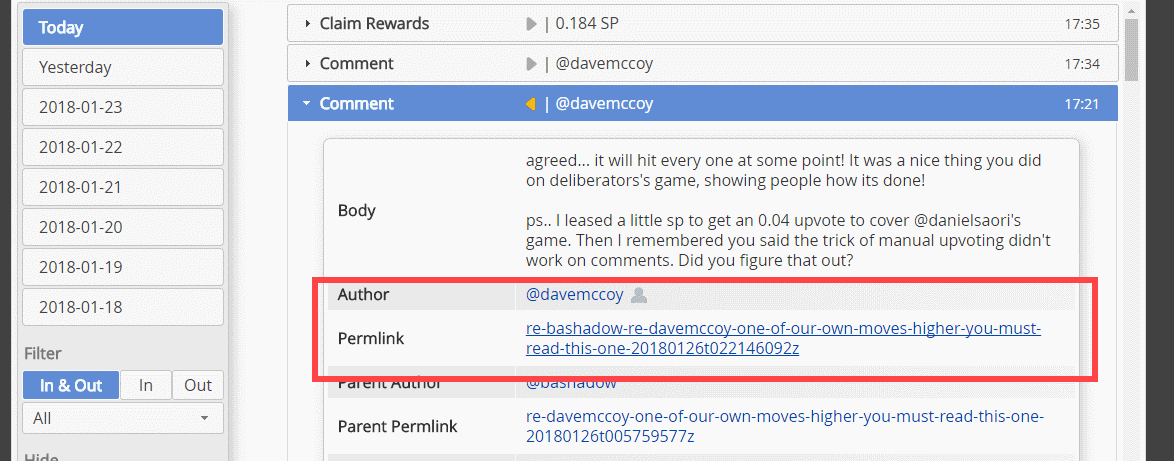
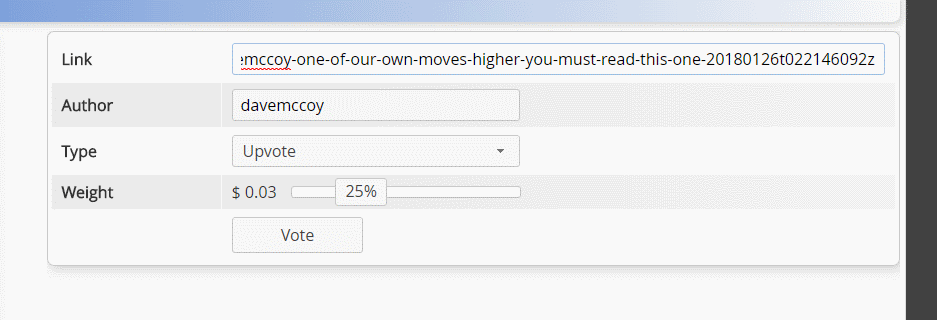
Paste the link in the link box, it should fill out the author box.
Set the slider where you want it, and click vote.
[IMAGE: https://steemitimages.com/DQmXpBiL9tZcxfJk3woxdq7nsYGZia6j3eKFdhioZWQXYsZ/pasted%20link%20part%201.png]
That is how you would vote for a comment that you commented on.
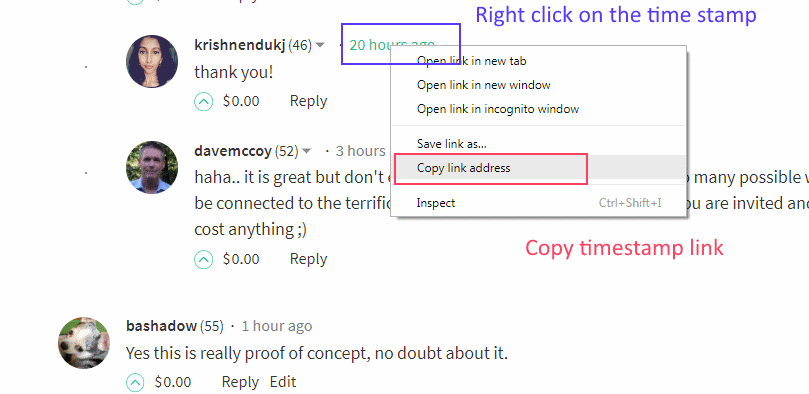
To vote on a comment in a blog without commenting here is how it is done.
Right click on the "Timestamp", and copy that link
[IMAGE: https://steemitimages.com/DQmaEuv1YZTJuruTmxumYb1c2UXSxZMBCNPTFjvFAcb3TSx/vote%20a%20comment%20only%20step%201.png]

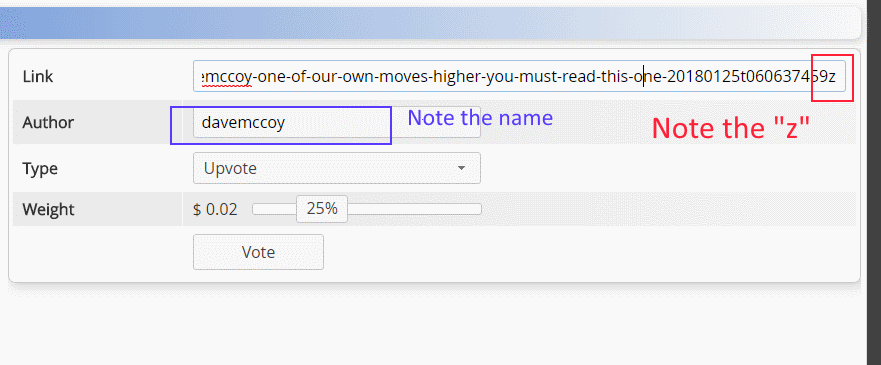
Paste that link into the link box. Note the "z" at the end of the link, and the name that auto filled in the Author box.
[IMAGE: https://steemitimages.com/DQmNtykausNoX4ioAUyqcF1mcucb6aCw4BpS1z43jPujjzL/vote%20a%20comment%20only%20step%202.png]

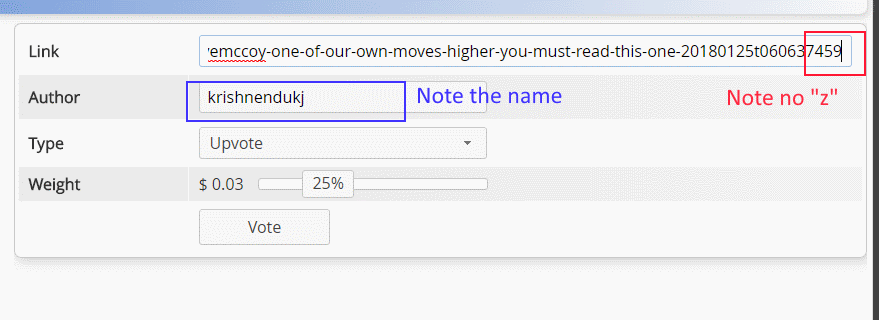
Remove that "z", and then look at the Author box to make sure the name changed to the person you want to vote on.
[IMAGE: https://steemitimages.com/DQmTQriD69Pjd2m7SEfjeAHK9tMfaxQxtAszdkZ5YGVsfPH/vote%20a%20comment%20only%20step%203.png]

Set the slider and click the vote button.

To manually vote for a blog post just copy its link paste it in the link box and then set your slider, and click vote.
Visit @steemchiller page on occasion and see what else he has been doing.

TAGS: [ #justbecause ] [ #newbieresteemday ] [ #steemworld ] [ #help ] [ #quicktips ]

Replies

@davemccoy | Jan. 26, 2018, 3:25 a.m. | Votes: 0 | [ VOTE ]

awesome... good job... now I just have to get my posting key to work in it... I completely understand and I will see if I can upvote you this way ;)

@davemccoy | Jan. 26, 2018, 3:29 a.m. | Votes: 0 | [ VOTE ]

awesome it worked... very cool... Now I understand, thank you :)

@bashadow | Jan. 26, 2018, 3:35 a.m. | Votes: 0 | [ VOTE ]

Glad it worked, It was a quick post to get you the information, I need to clean the post up and make it look better. But important thing is pretty or ugly the info got through. ;-} pretty can always be added in later.

@davemccoy | Jan. 26, 2018, 4:03 a.m. | Votes: 0 | [ VOTE ]

its looks good and gets the point made. Very good... Now I can learn even more tomorrow. Thanks teammate!

@bashadow | Jan. 26, 2018, 4:08 a.m. | Votes: 0 | [ VOTE ]

Your welcome, It really won't save you from getting into the 70% range or less, trust me on that, i keep hitting those low points. 76% vote power as I type. But more to go around, makes it fun. ;-}

@davemccoy | Jan. 26, 2018, 3:35 a.m. | Votes: 0 | [ VOTE ]

I'm resteeming so I can point to this article later... Also you have one tag left, why don't you use my #quicktips

@bashadow | Jan. 26, 2018, 3:37 a.m. | Votes: 0 | [ VOTE ]

Done.

@ilovepoorpeople | Jan. 27, 2018, 8:18 p.m. | Votes: 2 | [ VOTE ]

I am the "Tag-Lifter" and you have been resteemed because you tagged your post #newbieresteemday

[IMAGE: https://steemitimages.com/DQmfWfF68YRtMwc1e8g7v4QXar5wvLbucwXkWVWYkdUqUQC/image.png]
(source)

You have been resteemed as part of #newbieresteemday ... I made today my #newbieresteemday, and invite you and others to do the same. To learn more: Come Join Us!!! (Newbie Resteem Initiative)

[ BACK TO TRENDING ] [ BACK TO MENU ]
CMD>