[IMAGE: https://steemitimages.com/DQmfDjdkXyuaJnVnPudq5LeaTx1wLWhDCx5eriVcUY5DQQi/canok.png]

Source Image
Repository
https://github.com/LibreOffice/core
What Will I Learn?
In the video I give an explanation how to create pivot table.
- You will learn how to using Pivot table.
- You will learn about Pivot table layout.
- You will learn about placing pivot table destinations.
- You will learn how to change display of pivot table.
- You will learn how to filter pivot table data.
What is LibreOffice Pivot table?
A pivot table make it easy rearrange, sort, and filter data in a table without using formulas. this is very useful and makes the data can be used more instantly.
Requirements
- System Requirements : Program Install Support Install and Uninstall
- System Requirements : No special requirements.
- OS Support : Windows (XP, 2003, Vista, 7, 8 and 10) GNU/Linux (x86 and x86-64, RPM and DEB based Linux distributions) Mac OS X (x86-64 only)
Information
- Website & Download : https://www.libreoffice.org/
- Type : Office suite software
- License : MPLv2.0 (secondary license GPL, LGPLv3+ or Apache License 2.0)[9]
- Operating System : Linux, Windows, macOS,[5] FreeBSD, OpenBSD,[6] NetBSD, Android (Viewer)
- Platform : IA-32, x86-64, ARMel, ARMhf, MIPS, MIPSel, PowerPC, Sparc, S390, S390x, IA-64 (additional Debian platforms)[7]
Difficulty
Intermediate
Description
Pivot table is a unique function that makes users more easily get more instant data results. pivot table does not use a formula to determine the result, you can use pivot table to rearrange, sort, filter data very quickly and easily.
[IMAGE: https://steemitimages.com/DQmWM7iwtwdkivi7QYC4yuj5egofycsmZFG2UqeA5PZZVYT/five.PNG]
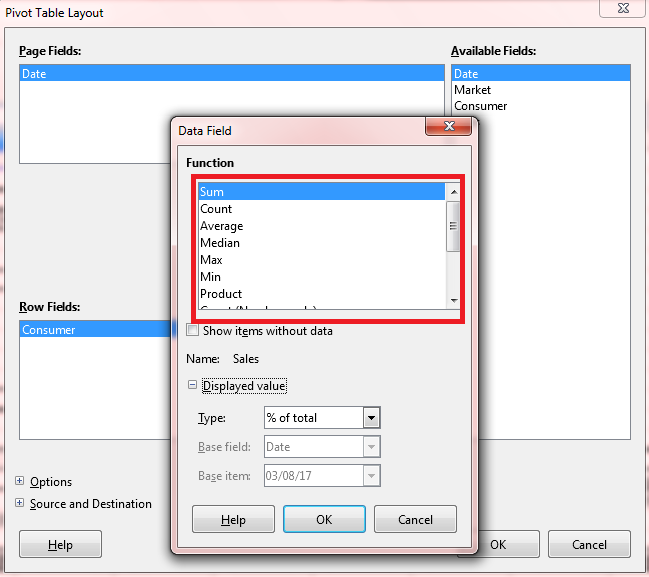
In the photo above, at the time of making pivot table, there are many functions such as Data Field, data field give some function like, Sum, Count, Average, Median, Max, Min, Product, StDev, StDevP, Var, VarP which have same function as formula.
[IMAGE: https://steemitimages.com/DQmYGKp2HhAHMZ6SRLQSArM97mcBa6Xcy9JCNAxVReViLvK/first.PNG]
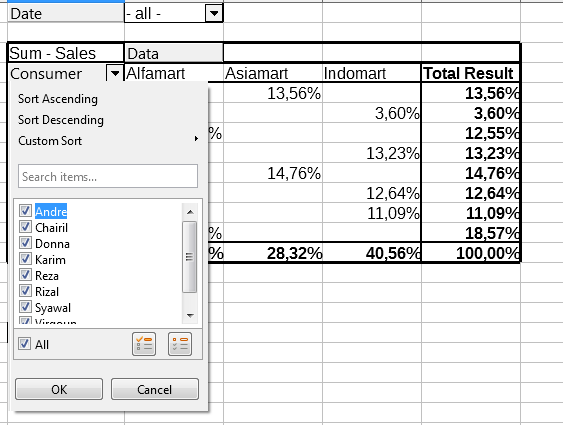
In the photo above, the Pivot table can sort the data to be displayed by simply checking and unchecking the options.
[IMAGE: https://steemitimages.com/DQmVZc8eGNVbQpoWmfhPMFLP3qQEBf79nfWyej9fvh3dzWx/second.PNG]
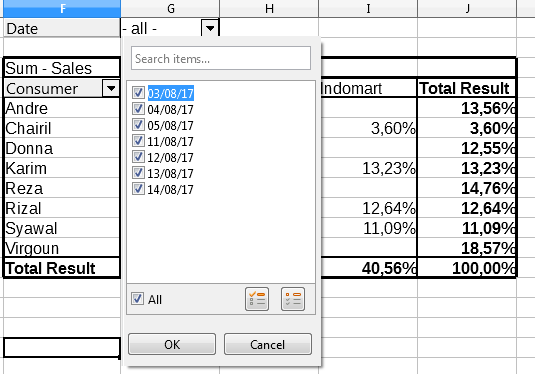
In the photo above, sorting data by date can be done simply by checking and unchecking options.
[IMAGE: https://steemitimages.com/DQme1LUQJkzkSfn27j7wQeZbC4b3cmKL6ACJATcwP56RmNR/third.PNG]
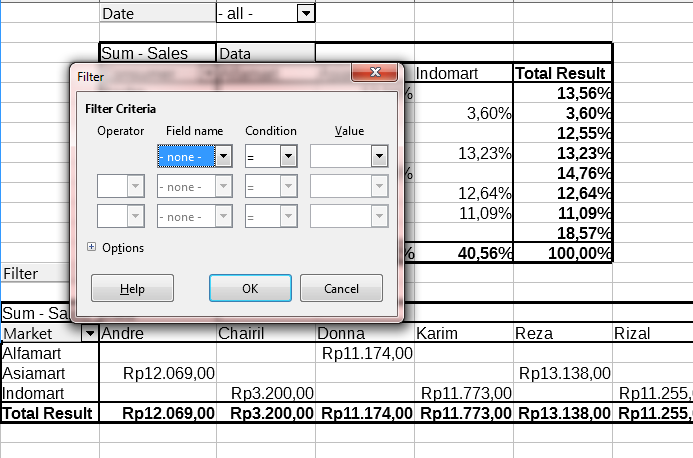
In the photo above, adding a filter feature to the pivot table is done when creating a pivot table. filter provides a choice of criteria to determine the data to be filtered, the criteria filter has 2 operators namely AND & OR function. so you can determine the filter results you need more accurately.
[IMAGE: https://steemitimages.com/DQmXz2VHRZ7LsD1ouEgJzBFVk2oKCnrzpUXpco6oAghTQbA/fourth.PNG]
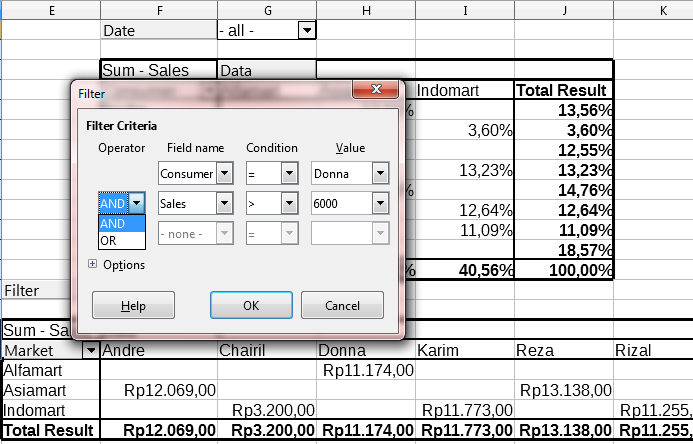
In the photo above, while filtering the data, you can also specify the data condition with some condition options, such as = , < , > , <= , >= , <> . and determine the value that makes the results more accurate.
Video Tutorial
https://youtu.be/AFClsKXG6Zk
Proof of Work: Pivot Table Sort & Filtering data
You can download my pivot table sort & filtering data files
Curriculum
- How to Looking for a blank value and mark it on LibreOffice Base
- How to Looking a value using IF Function Wizard on LibreOffice Base
- Continue to Grouping data Report on LibreOffice Base
- Or you can find more tutorials on my profile