[IMAGE: https://cdn.steemitimages.com/DQmdscfmT7ZxVvAMAkywrnS8B1nAqFoqzLQvNCcEVFLo4r8/image.png]
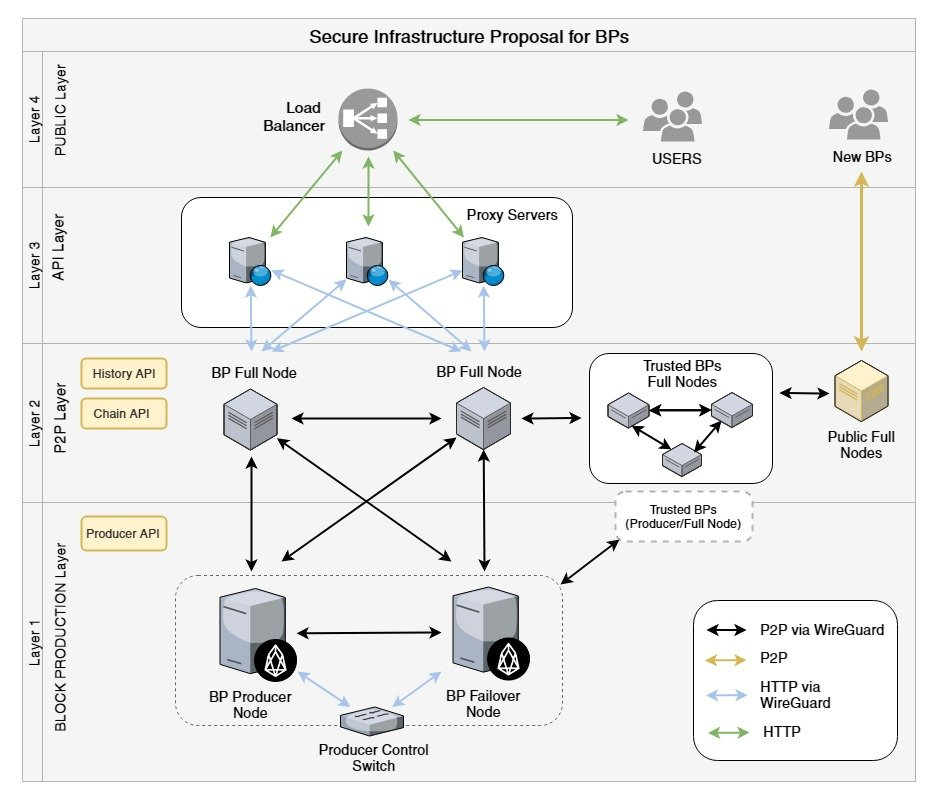
I’m EducatedWarrior from CSX Community ( @csx-eos ), a block producer candidate for EOS. In this article, I will talk about the benefits of using Docker for setting up your Distributed Blockchain Infrastructure.
First of all thanks to the @cryptolions , @eosrio , @hkeos, @eostribe and other groups involved in the Ghostbuster testnet. These docker scripts were built on top of the scripts provided.
From the beginning, I used docker to create EOS nodes and at first found it very simple using the provider scripts. I meshed with the Jungle Testnet, then later Ghostbusters. When meshing with Ghostbusters I learned from that community it was going to take more skills to run an EOS node effectively to assure security.
The instructions received from Ghostbusters were similar to JungleTestnet, but required installing Wireguard VPN and Keybase. Manually configuring Wireguard VPN and Keybase to work could be a pain, but getting them to work with Docker could be challenging. BUT YOU ARE THE LUCKY ONE!!! I went through the pain of figuring out so you don’t have to.
The top two things that weight heavily on block producer minds are security and scaling up as usage on the EOS network demands. Containerized services allow infrastructure to more easily be scaled up by adding distributed compute, storage and memory; and adds tools to increase security such as isolated non-routable networks.
KEY TERMS
- Docker Compose –
A docker compose file is a text file which describes your virtual infrastructure and consists of the following
containerized services - ex. public api node, private block producer node, private wallet - volumes - persistent storage
- virtual networks
- environment files
BENEFITS OF USING DOCKER
Containerized Services
- Easy upgrades - I have two API nodes running behind a load balancer. I need to upgrade to a new version of EOS with minimum downtime. Typically in normal setups, I would take the server down uninstall, compile the new code, then install the upgraded code. With docker, you can in parallel continue to run the node and compile the code at the same time. When the code is compiled, you issue one command to upgrade the container. Much faster update.
- Images - images can speed up upgrades even more since the code will already be compiled. Docker hub allows developers to create triggers of their code in Github to automatically trigger image builds after a code commit.
- Resource Scaling - One of the major questions BPs have is how to scale up the EOS network as usage demands. Containerized services allow infrastructure to more easily be scaled up by adding distributed compute, storage and memory.
Volumes -
- Persistant Storage - this is the feature which allows for quick upgrades by segregating the programs which need to be updated from the data that defines the state.
- Migrations - At some point hardware of the nodes will need to be upgraded. While the hardware upgrade is taking place, to avoid downtime the nodes with their data need to be migrated to another server. Using docker this process could be immensely simplified. Using volume drivers like Flocker to allow migration of docker containers with their persistent storage while it is up and running. Wow!!! You may not need to use that functionality if your stage is sitting on a SAN, but it is there.
Virtual Networks -
One the main security concerns run an EOS network is the risk of private keys being intercepted. In a typical corporate setup you have an intranet using unrouteable subnets for private traffic and internet access for public traffic. In the cloud environment setting this up could be a challenge if you don't have the right tools. We are currently using docker to create an isolated network to link our wallet with our public api node which provides the necessary layer of security.
Quick shout out to @tiktuk for publishing instructions on how to set up a secure wallet using docker.
https://steemit.com/eos/@tiktuk/fast-and-secure-eos-block-producer-voting-with-cleos-in-docker
Environment Files -
allows you to set environment variables in a container which could be used to configure the container. Below is a sample environment configuration file I'm currently using to configure block producer nodes. You can specify networking, vpn, and node mode of operations and the node will be configured accordingly. For NODE_MODE there are three modes (vpn, bridge, p2p, api). The NODE_MODE setting determines what plugins are used in the nodeos configuration file, whether to use vpn meshing, etc.
For those familiar with Ghostbuster install scripts, the environment file below allows for the my_peer_info and params.sh files to be updated with the correct values so that install scripts could be executed.
# OS
AUTO_START_NODE=false
AUTO_START_OPTION=

# Networking
PUBLIC_IP_ADDR=XXX.XXX.XXX.162
PRIVATE_IP_ADDR=XXX.XXX.XXX.55
NODE_API_PORT=8787
NODE_BIOS_PORT=8889
NODE_P2P_PORT=9806
WALLET_HOST=127.0.0.1
WALLET_PORT=8888

\# Wireguard VPN
WG_PUB_KEY=YYYYYYYYYYYYYYYYYYYYYYYYYYYYYYYY=
WG_PRIV_KEY=XXXXXXXXXXXXXXXXXXXXXXXXXXXXXX=
WG_SAVE_CONFIG=true
WG_DNS=1.1.1.1
WG_LISTEN_PORT=5858
WG_ADDRESS=XXX.XXX.55/22


# EOS Node Env Vars
NODE_MODE=vpn
ISBP=true
SERVICE_NAME=csx_nodeos_bp1
PRODUCER_NAME=csxcommunity
PRODUCER_URL=https://eos_csx_io.keybase.pub/bp_info.json
PRODUCER_PUB_KEY=XXXXXXXXXXXXXXXXXXXXXXXXXXXXXXXXXX
PRODUCER_PRIV_KEY=XXXXXXXXXXXXXXXXXXXXXXXXXXXXXXXXXXXXXXXXXXXX
DATA_DIR=/opt/eosio/bin/data-dir
WHATS NEXT?
Based on interest we will make the docker scripts available for public use within next week and will write up instructions for use.
Please reply and/or upvote post if you like this post.