___  ___    _ _    _  _ _____   _____
 / __|/ _ \  | | |  | || |_ _\ \ / / __|
| (_ | (_) | |_  _| | __ || | \ V /| _|
 \___|\___/    |_|  |_||_|___| \_/ |___|

 --- A GOPHER-LIKE INTERFACE FOR HIVE BLOCKCHAIN ---

[D-4] BTCD를 KMD로 스왑해보자. (+점블러 이야기)

BY: @flame91 | CREATED: Aug. 13, 2017, 5:57 p.m. | VOTES: 36 | PAYOUT: $7.26 | [ VOTE ]

코모도를 직접 사지않고 BTCD를 스왑하는게 이득인가?

정답을 말씀드리자면, 가격면에서는 이득입니다.
1BTCD당 48.92개의 코모도가 지급되므로 현재 시세로
>1KMD=33,437사토시, 1BTCD=1,518,258사토시
>48.92*33,437=1,635,738
>1,635,738/1,518,258=1.077
>1.077 (퍼센트 변환) 7.7%

수수료를 제외하고도 약 7%의 이득이겠네요.

주의할 점은 사이트로 한 번 입금된 BTCD는 인출이 불가하며,
코모도 지급 또한 실제 스왑이 이루어지는 8/18까지 기다려야한다는 점입니다.
이 점을 염두에 두시기 바랍니다.

SuperNet의 ICO 홈페이지 오픈과 점블러 관련 공지

코모도(Komodo) 소유자들을 대상으로 한 점블러(Jumblr) 스냅샷까지 얼마남지 않았습니다. 이틀 전 SuperNet이 코모도 ICO 사이트를 다시 오픈함과 함께 3만대 밑에서 머물던 코모도의 가격이 6만까지 치솟았는데요.

정확히는 이런 내용의 발표였습니다.

요약해보자면

본문에는 없지만 들리는 얘기로는

따라서, 안전하게 분배받기 위해서는 코모도를 agama 등의 개인지갑으로 옮기는 게 좋겠죠?

agama 관련글은 goldenman님의 글을 참고하시기 바랍니다.
[KMD] Komodo 코모도 개인지갑 AGAMA를 설치해보자
[KMD] Komodo 코모도 이자받기 총정리

BTCD to KMD

서론이 길었네요. 본격적으로 BTCD 스왑에 대해 적어보도록 하겠습니다.
BTCD 스왑은 코모도 ICO 사이트에서 할 수 있습니다.

[IMAGE: https://steemitimages.com/DQmTuqX2DLTPh4D8WGd83EyodEGWGSqfHHvKdGnuixamLLf/image.png]
진행을 위해서는 가입이 필요합니다. [Register]를 눌러 가입을 진행합니다.
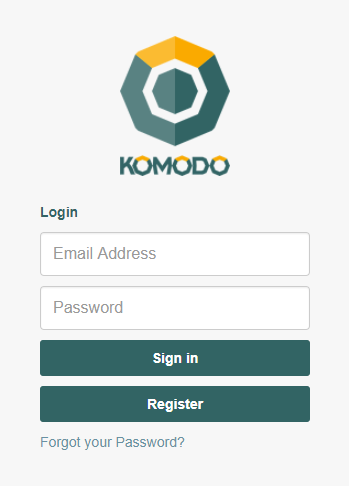
[IMAGE: https://steemitimages.com/DQmQJNVXduWatCeCfxz3g2BpU3rPLGBuwPhjrXFy2NERpff/image.png]
e-mail주소와 비밀번호를 입력하고 [Register]를 누릅니다.
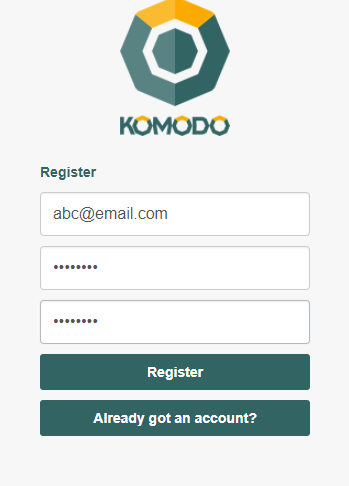
가입이 완료되었으면 다시 메인페이지로 돌아가 로그인합니다.
이제 코모도 주소생성을 위한 과정이 필요합니다.
(기존 주소 보유자도 반드시 거쳐야함)

코모도 주소생성

[IMAGE: https://steemitimages.com/DQmcpw7NPUoWz6jTLpcRxWgbRd79UKdLDEer7ogXoZLa8ud/image.png]
로그인을 하면 다음과 같은 화면이 뜹니다.
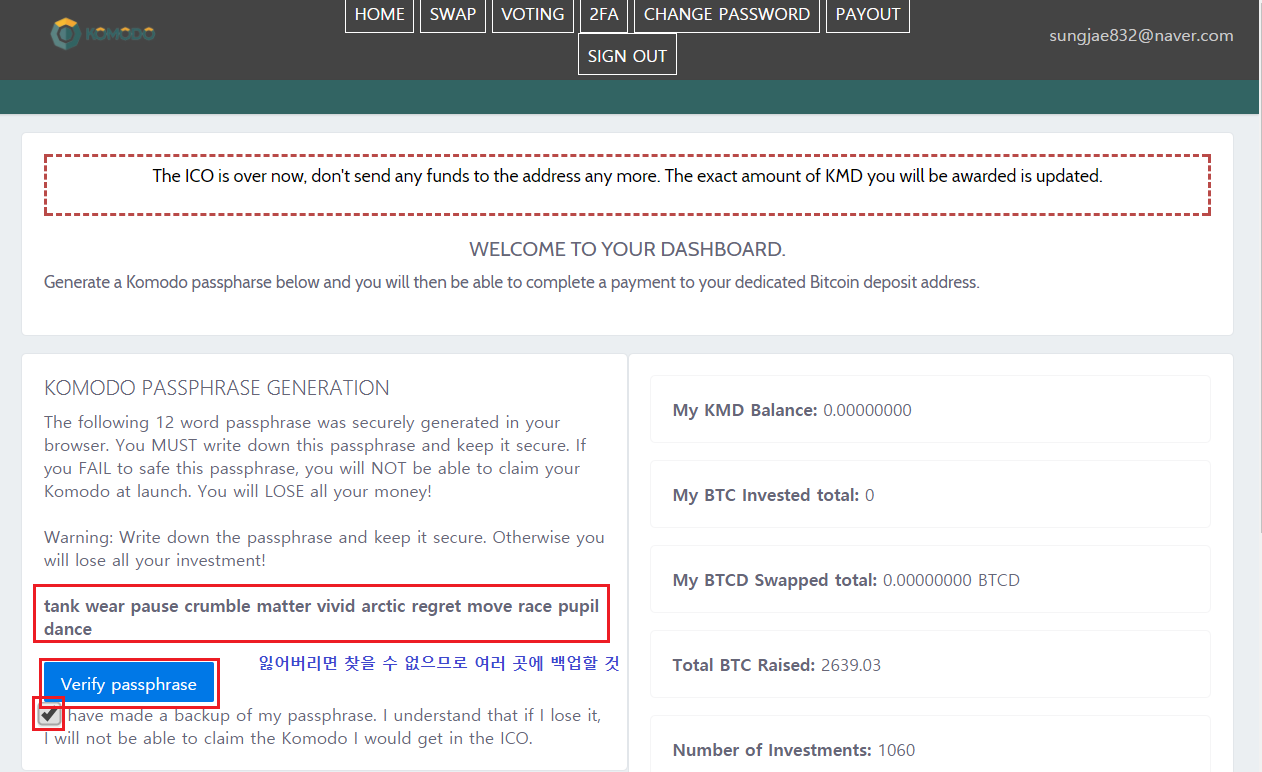
볼드체로 영어단어가 몇 개 적혀있습니다. passphrase로, 로그인 시에 반드시 필요합니다. 절대로 잃어버리지 않도록 종이, 메모장 등 여러 곳에 백업해놓도록 합시다.
백업이 완료된 경우 '나는 passphrase 백업을 완료하였고
이를 분실하여도 이의를 제기하지 않을 것이다.'
라는 내용에 체크 후 [Verify passphrase]를 클릭합니다.

[IMAGE: https://steemitimages.com/DQmXX5WoEvZd9rqc5HRpcrjLEZxxkZCuKgjKa6K4K82yZ5q/image.png]
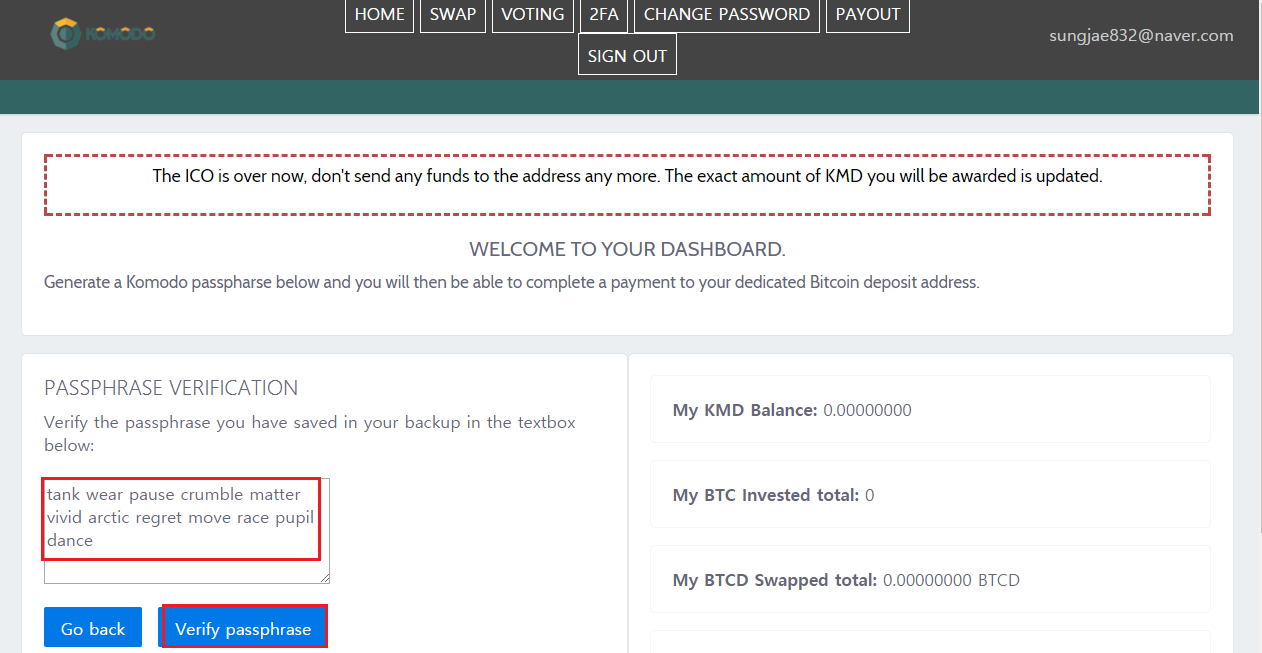
아까 백업한 passphrase를 복붙합니다.
복사하지 못한 경우 [Go Back]을 눌러 다시 복사하도록 합니다.
완료되었으면 [Verify passphrase]를 클릭합니다.
[IMAGE: https://steemitimages.com/DQmfXG3K9Pf7patwYJHsBNt6YLRD2iDXnf5XCDt5oBJPgh3/image.png]
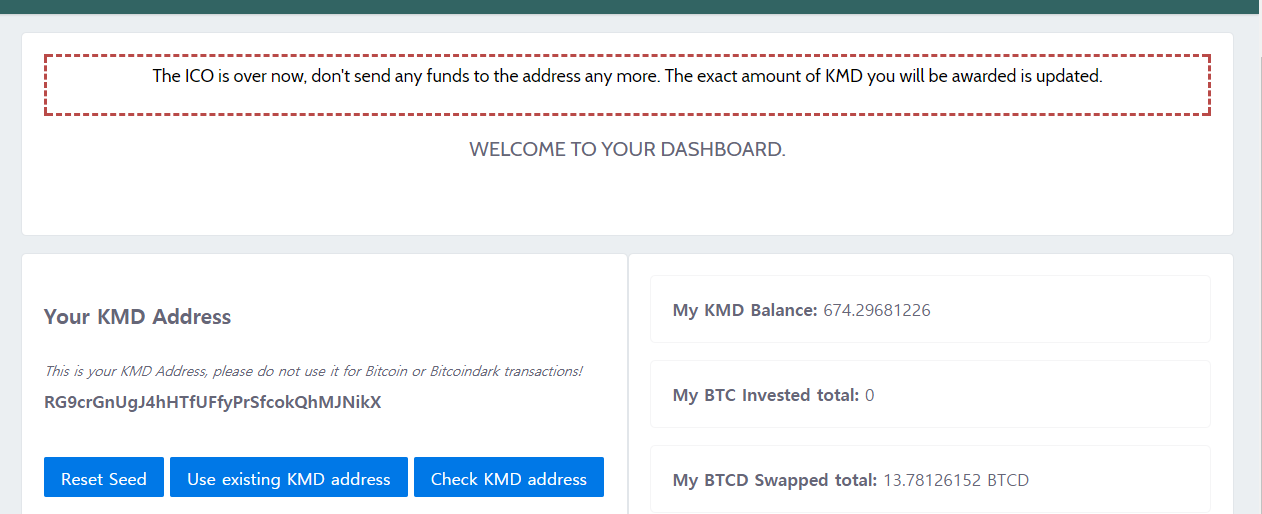
드디어 당신만의 코모도 주소가 생성되었습니다!
기존에 보유한 코모도 주소로 변경

[IMAGE: https://steemitimages.com/DQme9SKAYG67oyquG4HdL3co3cQFkfY1FDGhCeLt6vTXP9J/image.png]
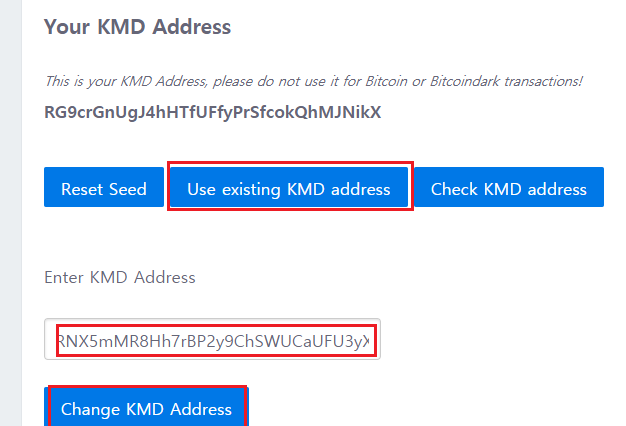
[Use existing KMD address]를 클릭하여 기존주소 입력 후,
[Change KMD Address]를 클릭합니다.
[IMAGE: https://steemitimages.com/DQmZcZibbuFsw88P4cUF9FASrFwbVZvKJMRf4NW66oxyhrc/image.png]
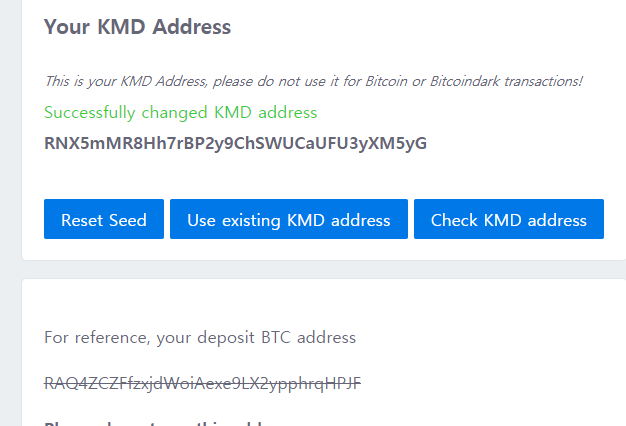
제대로 변경된 경우 Successfully changed KMD address라는 메시지가 뜹니다.
스왑 신청

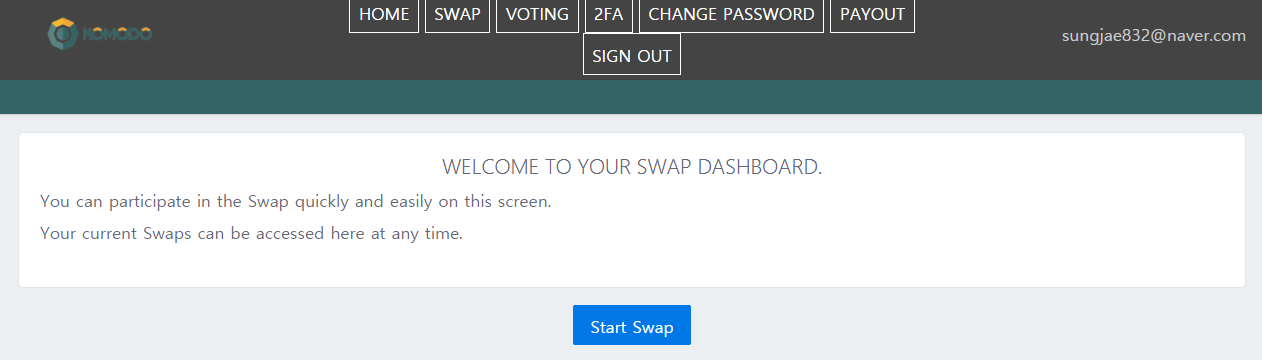
화면 상단 탭의 [SWAP]을 클릭합니다.

[IMAGE: https://steemitimages.com/DQmQVxzGf5p8Qga5pEfth2CfuDAFxp2juMe3mVtGNX3XWYM/image.png]
[Start Swap]을 클릭합니다.
[IMAGE: https://steemitimages.com/DQmWLBo4CJL1MAQGnH5uUcG6oG6dkRJGoqVfUrJmEZvJgco/image.png]
개인 BTCD 주소가 화면 좌하단에 생성됩니다.
기존에 보유한(혹은 거래소에서 구입한) BTCD를 자신의 BTCD 주소로 보내시면 됩니다.
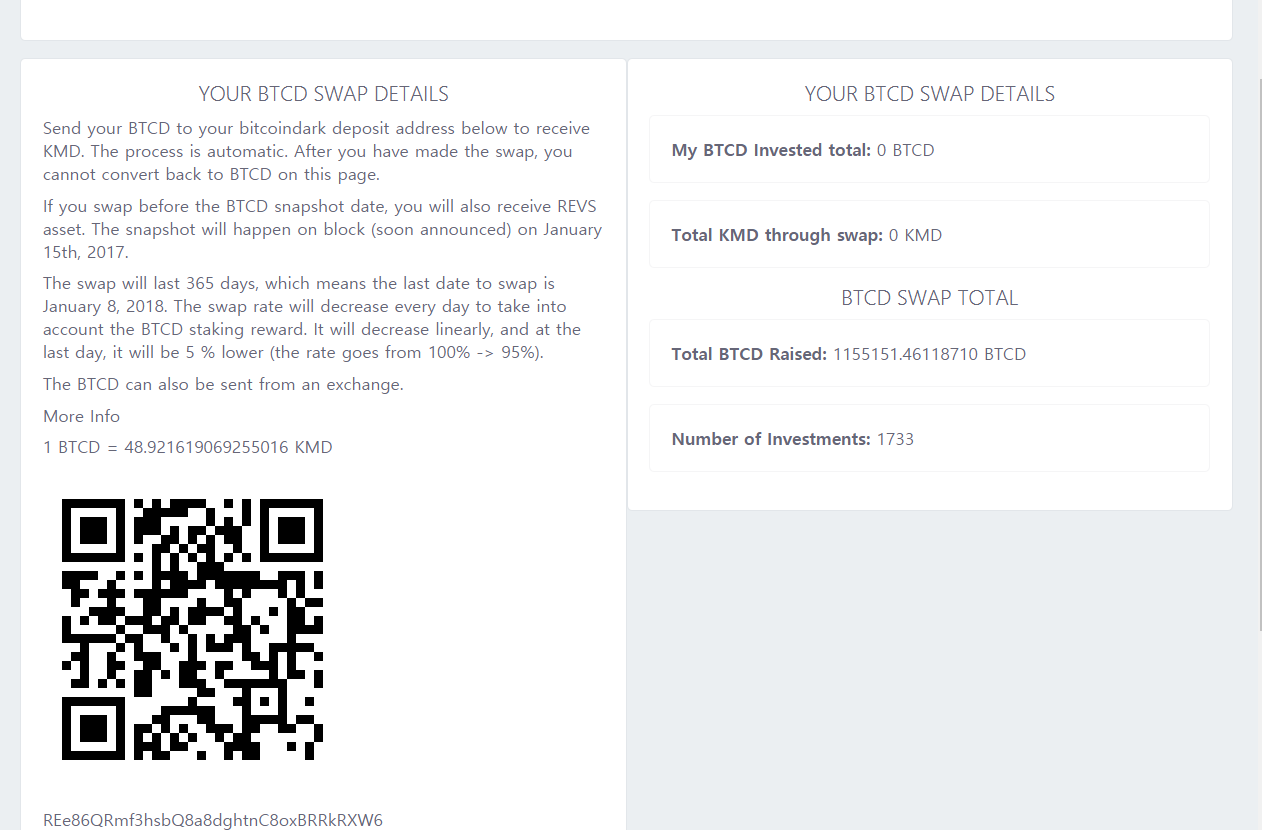
8/18일에 1BTCD당 약 48.92개의 KMD를 받게 되며
이 수치는 선형적으로 감소하여 마지막 스왑일에는 1BTCD당 45개의 코모도가 지급됩니다.

[IMAGE: https://steemitimages.com/DQmP71nzJkp5QAqxCMXqY56x6YdaNeZvv79a7xw4reXSP9t/image.png]
BTCD 입금여부는 [HOME]의 TRANSACTION HISTORY에서 확인하실 수 있습니다.
단, 저 Deposited 추적링크는 작동을 안하므로 입금추적은
BTCD Explorer를 이용해주세요.

[IMAGE: https://steemitimages.com/DQmfXG3K9Pf7patwYJHsBNt6YLRD2iDXnf5XCDt5oBJPgh3/image.png]
입금이 확인되었으면 코모도 출금요청을 해봅시다.

코모도 지급(PAYOUT)신청

화면 상단 탭의 [PAYOUT]을 클릭합니다.

[IMAGE: https://steemitimages.com/DQmPhm6cZTMPxS51U2szGyN2kZWo7wgPK9TtbP1iiDEwshj/image.png]
[Request payout]을 클릭합니다.

[IMAGE: https://steemitimages.com/DQmbpXNc3QUF7xCUSKQvrERnXAuMPax1yFMeZEMWTZNWgQT/image.png]
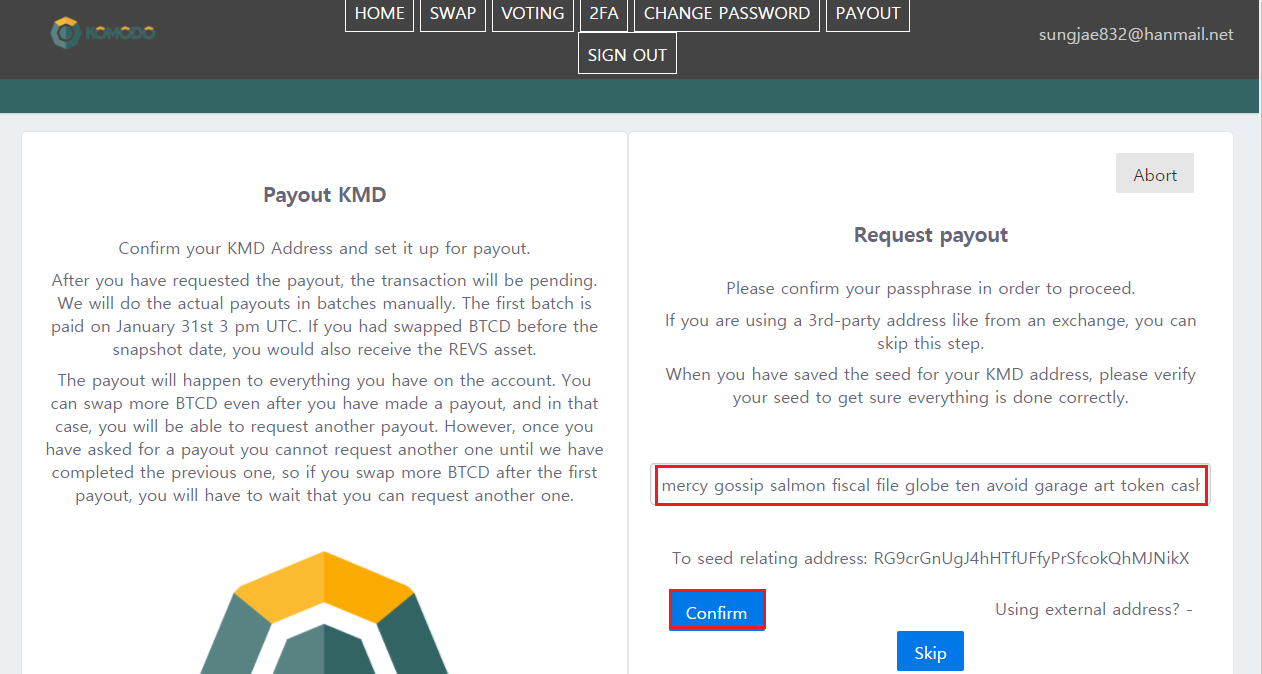
KMD를 지급받을 지갑의 passphrase를 입력합니다.
아까 코모도 개인 주소를 변경하신 경우 변경된 주소의 passphrase를 입력하시면 됩니다.
입력이 완료되었으면 주소가 맞는지 확인 후 Confirm을 누릅니다.
[IMAGE: https://steemitimages.com/DQmW7kYvKzqxRx6cxHWZXrom8y9yGjtnBmnjjRULvs8nMhz/image.png]
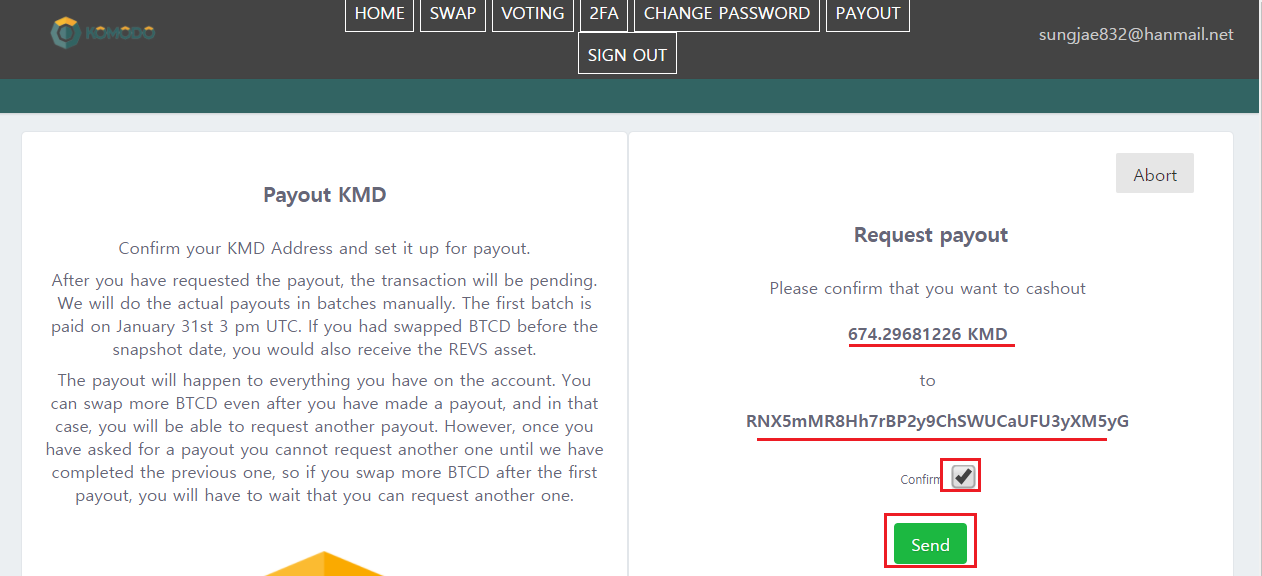
마지막으로 지급받게 될 코모도의 수량과 주소를 확인 후에 Confirm에 체크 후 [Send]를 클릭합니다.
주의사항 : 한 번 지급요청을 한 이후, 추가로 입금되는 BTCD는
차회(10/31)에 지급요청이 가능합니다.
반드시 한 번에 묶어서 지급신청을 해주세요.
지급요청이 완료되었다는 메시지가 뜹니다.
이제 8/18 자신의 지갑에 코모도가 들어오기만을 기다리면 됩니다!

주의사항

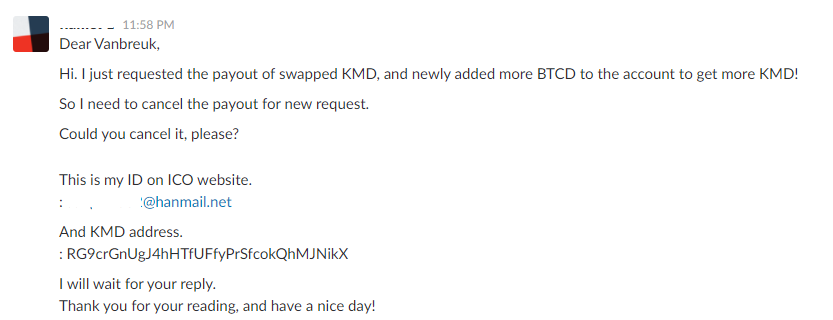
저같은 경우 지급요청을 한 번 한뒤에, 추가로 BTCD를 입금하였습니다.
이런 경우, SuperNET Slack
가셔서 vanbreuk이란 사람에게 기존의 PAYOUT신청을 취소해달라고 해야합니다.

[IMAGE: https://steemitimages.com/DQmfZd1GVdxAoBmrrtREHB9fkHPPsvmxU3aXrsCoMtb9XZm/image.png]
위와 같이, 요청하실 때 자신의 ICO 홈페이지 ID, KMD 지갑주소를 알려주시면 됩니다.
마치며

비트의 가격변동으로 인해 알트의 가격예측이 어려운 시점입니다.
BTCD, 코모도의 가격하락이 걱정되시면, BTCD 스왑시점인
8/18이 임박할 때까지 분위기를 살피시다가
스왑을 하시는 것도 현명한 선택이라 생각됩니다.

도움이 되셨다면 FOLLOW & VOTE 부탁드립니다!
TAGS: [ #coinkorea ] [ #cryptocurrency ] [ #kr ] [ #crypto-news ]

Replies

@minnowbooster | Aug. 13, 2017, 5:59 p.m. | Votes: 0 | [ VOTE ]

[IMAGE: http://minnowshares.net/upgoat/?user=flame91&receiver=flame91&value=1.87&hash=101]
@flame91 got you a $1.87 @minnowbooster upgoat, nice! (Image: pixabay.com)

Want a boost? Click here to read more!

@iknowyourider | Aug. 13, 2017, 6:33 p.m. | Votes: 1 | [ VOTE ]

English Translation (Google Translate):

Is it a benefit to swap BTCD without buying Komodo directly?
If I say the correct answer, it is a gain in price.
48.92 Commodities per BTCD are paid,

1KMD = 33,437 Satoshi, 1BTCD = 1,518,258 Satoshi
48.92 * 33,437 = 1,635,738
1,635,738 / 1,518,258 = 1.077
1.077 (percent conversion) 7.7%

Except for the fee, it will be about 7%.

Please note that you can not withdraw BTCD once deposited into the site,
Komodo payments also have to wait until 8/18 when the actual swap takes place.
Please keep this in mind.

SuperNet's ICO homepage open and dot blur announcement
The Jumblr snapshot for Komodo owners is just around the corner. Two days ago, SuperNet reopened the Komodo ICO site, and the price of Komodo, which stayed below 30,000 units, skyrocketed to 60,000.

That was exactly the announcement.

To summarize

The BTCD swap will be 3/3, with 8/18, 10/31 and 1/15 next year.
Three payouts are remaining. August 18th, 2017 / October 31st, 2017 / January 15th, 2018
Once the last swap is over, the BTCD can no longer be changed to Commodore and the ICO site will be closed.
The ICO site will be closed soon after the last payout. After the deadlines are met, it will be no longer possible to swap BTCD or a KMD payout.
The point blur snapshot will be fast after the first swap (8/18)
The Komodo snapshot for the Jumblr token will be taken soon after the first Payout.
At this time, we will distribute point blur of 5% of total issue volume.
In total, we have promised to distribute 5% of the total JUMBLR supply.
Although not in the text,

If you have Komodo in your personal wallet at the time of the snapshot, you can distribute the dot blur. If you have it on the exchange, the exchange will have a dot blur.
Therefore, in order to securely distribute Komodo, you should move it to your personal wallet such as agama.

Agama is offline Old goldenman's Avatar
[KMD] Let's install Komodo Komodo Personal Wallet AGAMA
[KMD] Komodo Commodore Interest Receipt

BTCD to KMD
The introduction is long. Let's write about BTCD swap in earnest.
BTCD swaps are available at the Komodo ICO site.

You need to sign up to proceed. Click [Register] to proceed with the registration.

Enter your e-mail address and password and click [Register].

Once you have completed your subscription, return to the main page and log in again.
You now need a procedure for creating a komodo address.
(Existing address holders must also pass)

Create Commodore Address

When you log in, the following screen appears.

There are several English words in bold. Passphrase, required for login. Please make sure to back up to paper, notepad, etc. in order to avoid losing it.
If the backup is complete 'I completed the passphrase backup
I will not raise objections even if I lose them. "
And click [Verify passphrase].

I'll back up my passphrase.
If you can not copy it, press [Go Back] to copy it again.
When you are finished, click [Verify passphrase].

Finally, your own Komodo address has been created!

Changed to existing Komodo address

Click [Use existing KMD address] to enter the existing address,
Click [Change KMD Address].

Successfully changed KMD address message is displayed.

Swap Application
Click [SWAP] on the upper tab of the screen.

Click [Start Swap].

A private BTCD address is created at the bottom left of the screen.
You can send a BTCD that you already own (or purchased from the exchange) to your BTCD address.

You will receive approximately 48.92 KMD per 1 BTCD on 8/18
This figure will decrease linearly to 45 Commodities per 1 BTCD on the last swap day.

You can check whether you have deposited BTCD in [HOME] 's TRANSACTION HISTORY.
However, since the Deposited tracking link does not work, the deposit tracking
Please use BTCD Explorer.

Once the deposit has been confirmed, let 's make a Commodity withdrawal request.

Apply for PAYOUT
Click [PAYOUT] in the tab at the top of the screen.

Click Request payout.

Enter the passphrase of the wallet to receive the KMD.
If you change your personal address, you can enter the passphrase of the changed address.
When you are finished typing, confirm that the address is correct and press Confirm.

After confirming the quantity and address of Commodore that will be paid last, check Confirm and click [Send].
Note: After making a one-time payment request, the additional BTCD
You can make a payment request to the next meeting (10/31).
Please make sure to bundle them together at once.

I get a message that the payment request has been completed.
Now 8/18 Just wait for Komodo to enter your wallet!

Precautions
In the case of me, I made another payment request and then deposited another BTCD.
In this case, SuperNET Slack
Go ahead and ask someone who is vanbreuk to cancel your existing PAYOUT application.

As above, please provide your ICO homepage ID and KMD wallet address when requesting.

Finish
Alt is a difficult time to predict price due to the price fluctuation of the beat.
If you are worried about the price drop of BTCD and Komodo,
Look around the mood until 8/18 is imminent.
Swapping is also a wise choice.

Thank you FOLLOW & VOTE for your help!

@booster | Aug. 13, 2017, 7:09 p.m. | Votes: 0 | [ VOTE ]

This post has received a 1.33 % upvote from @booster thanks to: @flame91.

@woosungchoi | Aug. 14, 2017, 1:01 a.m. | Votes: 0 | [ VOTE ]

와우 정말 정성글이네요!!!

BTCD저도 잠시 들고있었는데요.

스왑일이 정해져있는지 몰랐네요.

점블러 소식 감사합니다.

@ineedthesleep | Aug. 14, 2017, 12:47 p.m. | Votes: 0 | [ VOTE ]

좋은 정보 감사합니다.

@goldenman | Aug. 17, 2017, 2:38 a.m. | Votes: 0 | [ VOTE ]

자세한 가이드네요! 초보분들에게 정말 도움되겠어요

@steemitboard | Aug. 18, 2017, 12:37 p.m. | Votes: 0 | [ VOTE ]

Congratulations @flame91! You have completed some achievement on Steemit and have been rewarded with new badge(s) :

[IMAGE: https://steemitimages.com/70x80/http://steemitboard.com/notifications/commented.png] Award for the number of comments received

Click on any badge to view your own Board of Honor on SteemitBoard.
For more information about SteemitBoard, click here

If you no longer want to receive notifications, reply to this comment with the word STOP

> By upvoting this notification, you can help all Steemit users. Learn how here!

[ BACK TO TRENDING ] [ BACK TO MENU ]
CMD>