[IMAGE: https://steemitimages.com/DQmYoJAjLzLikd6q48Q4vior65kdfmtfN2yMA55Yg9YjrxB/image.png]
오늘은 테스트넷에서 사용하는 비트코인 지갑을 만들어 보겠습니다.
1.Eclipse를 실행합니다.
만들어진 bitcoin-test 프로젝트에서 새로운 자바 class 파일을 생성합니다.
[IMAGE: https://steemitimages.com/DQmeKy1jBtXNxTKd5Lct6BvCM8HNFgpDNYUYM5Ebuo4g2UQ/image.png]
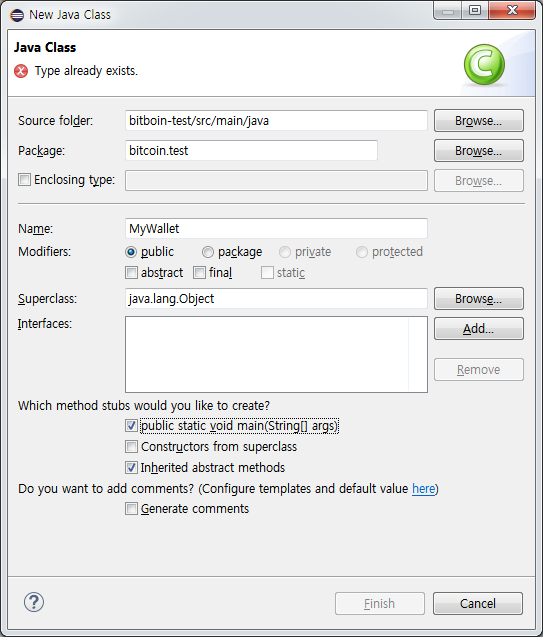
2. 지갑을 만들어 봅니다.
2.1. 테스트넷에 접속하는 NetworkParameters 메소드를 만듭니다.
> public NetworkParameters getTestNetParam() {
> return MainNetParams.fromID(MainNetParams.ID_TESTNET);
> }
MainNetParams.ID_TESTNET 은 비트코인 테스트넷에 접속하도록 해줍니다.
2.2. 지갑을 초기화하는 메소드를 만듭니다.
> public Wallet initialWallet(NetworkParameters params) {
> return new Wallet(params);
> }
Wallet 객체를 생성합니다. Wallet 객체는 NetworkParameters 를 인수로 받아들입니다.
지갑은 seed로 부터 생성할 수 있습니다. 여기서는 NetworkParameters 로 만듭니다.
이제 지갑 주소와 관련된 정보를 만들어 봅니다.
2.3. 지갑 주소 생성 및 관련된 정보 만들기
> public Map< String, String> processWallet(Wallet wallet) {
> HashMap< String, String> map = new HashMap< String, String>();
> DeterministicSeed seed = wallet.getActiveKeyChain().getSeed();
> seed.setCreationTimeSeconds(System.currentTimeMillis());
> String creationtime = Utils.dateTimeFormat(seed.getCreationTimeSeconds());
> String seedHex = seed.toHexString();
> List< String> mnemonics = seed.getMnemonicCode();
> String address = wallet.currentReceiveAddress().toBase58();
> String balance = wallet.getBalance().getValue()+" BTC";
> map.put("Address", address);
> map.put("Balance", balance );
> map.put("Seed", seedHex);
> map.put("Creationtime", creationtime);
> map.put("Mnemonics", Utils.join(mnemonics));
> return map;
> }
지갑 정보 및 관련 정보를 저장하기 위한 HashMap 객체를 생성합니다.
그리고 wallet으로 부터 Seed를 가져옵니다.
> DeterministicSeed seed = wallet.getActiveKeyChain().getSeed();
Seed로 부터 Seed 값, 생성 시간, 니모닉 정보를 읽어 들여 String 변수에 할당합니다.
> String creationtime = Utils.dateTimeFormat(seed.getCreationTimeSeconds());
> String seedHex = seed.toHexString();
> List mnemonics = seed.getMnemonicCode();
지갑 주소와 지갑의 잔고는 Wallet으로 부터 읽어들입니다.
> String address = wallet.currentReceiveAddress().toBase58();
> String balance = wallet.getBalance().getValue()+" BTC";
지갑 주소는 Base58 형식으로 읽어들입니다.
잔고는 Coin의 현재 잔고입니다. 잔고는 테스트넷에서 승인이 결과 값입니다.
현재 전송 중인 Coin의 잔고는 보이지 않습니다.
읽어들인 모든 값을 HashMap에 저장합니다.
> map.put("Address", address);
> map.put("Balance", balance );
> map.put("Seed", seedHex);
> map.put("Creationtime", creationtime);
> map.put("Mnemonics", Utils.join(mnemonics));
2.4 main 메소드에서 화면으로 출력합니다.
> public static void main(String[] args) {
> try {
> MyWallet myWallet = new MyWallet();
> Wallet wallet = myWallet.initialWallet(myWallet.getTestNetParam());
> Map map = myWallet.processWallet(wallet);
> System.out.println("Address : \t" + map.get("Address"));
> System.out.println("Balance : \t" + map.get("Balance"));
> System.out.println("Seed : \t" + map.get("Seed"));
> System.out.println("Creationtime : \t" + map.get("Creationtime"));
> System.out.println("Mnemonics : \t" + map.get("Mnemonics"));
> }
> catch (Exception ex) {
> ex.printStackTrace();
> }
> }
3. 실행 결과 보기
Eclipse에서 완성된 프로그램 소스를 저장한 후에, 실행을 합니다.(Ctrl + F11)
[IMAGE: https://steemitimages.com/DQmb95beone9TaPid5BRntaQq7KFQXAxhvSdPicg6jWQoUc/image.png]

화면에 주소, 잔고, 시드, 생성 시간, 그리고 니모닉이 출력됩니다.
- 다음에는 비트코인 HD 지갑을 사용하는 방법에 대해서 살펴보겠습니다.