[IMAGE: https://steemitimages.com/DQmWQDjyP5d1RNW3mkCWUkDQ6yh3uDJFUZErPpaKBwKi4gM/iron_modolee.png]
안녕하세요. 개발자 모도리입니다.
서비스 운영 중 로그 관리가 필요하여 예전에 구축했었던 ELK를 이용한 로그 관제 시스템을 다시 구성해 봤습니다.

ELK(ElasticSearch, LogStash, Kibana) 설치
[IMAGE: https://cdn-images-1.medium.com/max/1600/0*VPlFPpkbPY15EWte.png]
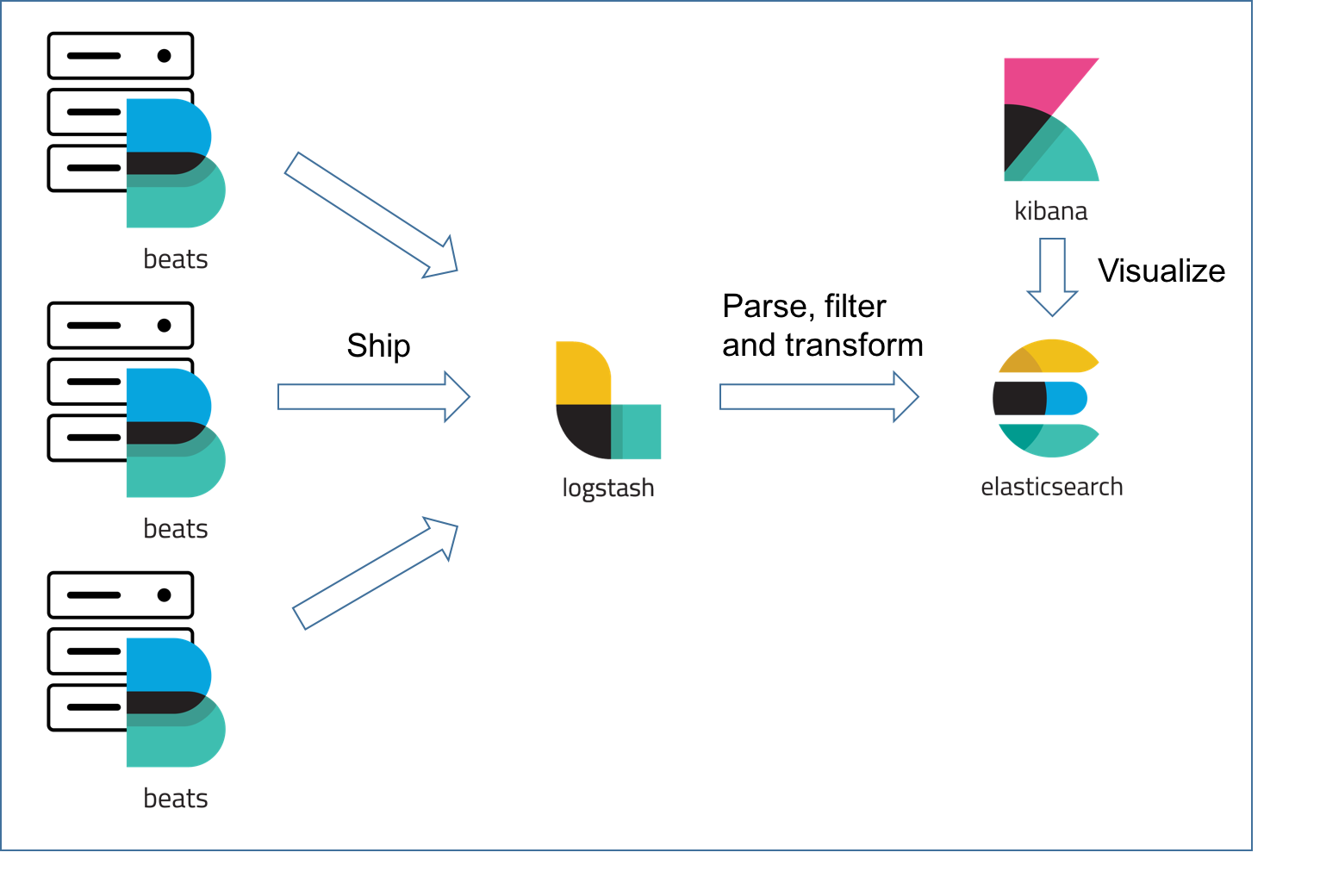
- 로그를 생성하는 서버들에 Filebeat를 설치하고, 로그를 집계할 서버에 ELK를 설치한다.
- Filebeat에서 LogStash로 로그를 전송하고 LogStash에서 한번 필터링을 거친 로그들이 ElasticSearch에 저장된다.
- 저장 된 로그는 Kibana를 통해서 시각화하여 볼 수 있다.
권장 사항
- 메모리 4GB 이상 (ELK를 한 대에 서버에 설치할 경우)
- JAVA 8 사용
JAVA 설치
Repository 추가 및 설치
sudo add-apt-repository ppa:webupd8team/java
sudo apt update
sudo apt install oracle-java8-installer
sudo apt install oracle-java8-set-default
자바 버전 확인
java -version
ElasticSearch 설치 (Log 수집 서버, Ubuntu)
파일 다운로드 및 설치
wget https://artifacts.elastic.co/downloads/elasticsearch/elasticsearch-6.6.2.deb
sudo dpkg -i elasticsearch-6.6.2.deb
시스템에 서비스 등록, 시작 및 상태 확인
sudo systemctl daemon-reload
sudo systemctl enable elasticsearch.service
sudo systemctl start elasticsearch.service
sudo systemctl status elasticsearch.service
 ● elasticsearch.service - Elasticsearch
   Loaded: loaded (/usr/lib/systemd/system/elasticsearch.service; enabled; vendor preset: enabled)
   Active: active (running) since Mon 2019-03-25 11:58:03 UTC; 13min ago
(나중에 필요한 경우) 서비스 등록 해지 및 중지
sudo systemctl disable elasticsearch.service
sudo systemctl stop elasticsearch.service
설치 확인
curl -X GET "localhost:9200/"
{
  "name" : "xQub8IM",
  "cluster_name" : "elasticsearch",
  "cluster_uuid" : "7RLVGGnxR6qHbV9mYqA_mg",
  "version" : {
    "number" : "6.6.2",
    "build_flavor" : "default",
    "build_type" : "deb",
    "build_hash" : "3bd3e59",
    "build_date" : "2019-03-06T15:16:26.864148Z",
    "build_snapshot" : false,
    "lucene_version" : "7.6.0",
    "minimum_wire_compatibility_version" : "5.6.0",
    "minimum_index_compatibility_version" : "5.0.0"
  },
  "tagline" : "You Know, for Search"
 }
Kibana 설치 (Log 수집 서버, Ubuntu)
파일 다운로드 및 설치
wget https://artifacts.elastic.co/downloads/kibana/kibana-6.6.2-amd64.deb
sudo dpkg -i kibana-6.6.2-amd64.deb
시스템에 서비스 등록, 시작 및 상태 확인
sudo systemctl enable kibana.service
sudo systemctl start kibana.service
sudo systemctl status kibana.service
 ● kibana.service - Kibana
   Loaded: loaded (/etc/systemd/system/kibana.service; enabled; vendor preset: enabled)
   Active: active (running) since Mon 2019-03-25 11:58:03 UTC; 13min ago
설치 확인
curl -v [Log 수집 서버 IP]:5601
* Rebuilt URL to: localhost:5601/
*   Trying 127.0.0.1...
* TCP_NODELAY set
* Connected to localhost (127.0.0.1) port 5601 (#0)
> GET / HTTP/1.1
> Host: localhost:5601
> User-Agent: curl/7.58.0
> Accept: */*
>
< HTTP/1.1 302 Found
< location: /app/kibana
< kbn-name: kibana
< kbn-xpack-sig: 292ada877125f67092b9a6a4b59b08ca
< content-type: text/html; charset=utf-8
< cache-control: no-cache
< content-length: 0
< connection: close
< Date: Tue, 26 Mar 2019 02:11:00 GMT
<
* Closing connection 0
LogStash 설치 (Log 수집 서버, Ubuntu)
파일 다운로드 및 설치
wget https://artifacts.elastic.co/downloads/logstash/logstash-6.6.2.deb
sudo dpkg -i logstash-6.6.2.deb
시스템에 서비스 등록, 시작 및 상태 확인
sudo systemctl enable logstash.service
sudo systemctl start logstash.service
sudo systemctl status logstash.service
 ● logstash.service - logstash
   Loaded: loaded (/etc/systemd/system/logstash.service; enabled; vendor preset: enabled)
   Active: active (running) since Mon 2019-03-25 12:10:22 UTC; 17s ago
FileBeat 설치 (Log 생성 서버, Amazon Linux(CentOS 계열))
파일 다운로드 및 설치
wget https://artifacts.elastic.co/downloads/beats/filebeat/filebeat-6.6.2-x86_64.rpm
sudo rpm -vi filebeat-6.6.2-x86_64.rpm
시스템에 서비스 등록, 시작 및 상태 확인
sudo systemctl enable filebeat.service
sudo systemctl start filebeat.service
sudo systemctl status filebeat.service
 ● filebeat.service - Filebeat sends log files to Logstash or directly to Elasticsearch.
   Loaded: loaded (/usr/lib/systemd/system/filebeat.service; enabled; vendor preset: disabled)
   Active: active (running) since 월 2019-03-25 21:41:23 KST; 51s ago
환경 설정
ElasticSearch
- 디렉토리 구조
https://www.elastic.co/guide/en/logstash/current/dir-layout.html
설정 파일 수정
sudo vi /etc/elasticsearch/elasticsearch.yml
- ElasticSearch와 binding 할 IP 주소를 설정한다. (port는 수정 안 할 경우 기본 9200)
network.host : 0.0.0.0
서비스 재시작
sudo systemctl restart elasticsearch.service
Kibana
설정 파일 수정
sudo vi /etc/kibana/kibana.yml
- Kibana와 binding할 IP 주소를 설정한다. (port는 수정 안 할 경우 기본 5601)
server.host : "0.0.0.0"
elasticsearch.url : "http://elasticsearch_server_address:9200"
서비스 재시작
sudo systemctl restart kibana.service
LogStash
설정 파일 생성
sudo vi /etc/logstash/conf.d/kstarlive-web.conf
input {
 beats {
   port => 5044
 }
}

filter {
  if [fields][log_type] == "nginx_access" {
    grok {
      match => { "message" => ["%{IPORHOST:[nginx][access][remote_ip]} - %{DATA:[nginx][access][user_name]} \[%{HTTPDATE:[nginx][access][time]}\] \"%{WORD:[nginx][access][method]} %{DATA:[nginx][access][url]} HTTP/%{NUMBER:[nginx][access][http_version]}\" %{NUMBER:[nginx][access][response_code]} %{NUMBER:[nginx][access][body_sent][bytes]} \"%{DATA:[nginx][access][referrer]}\"\"%{DATA:[nginx][access][agent]}\""] }
      remove_field => "message"
    }
    mutate {
      add_field => { "read_timestamp" => "%{@timestamp}" }
    }
    date {
      match => [ "[nginx][access][time]", "dd/MMM/YYYY:H:m:s Z" ]
      remove_field => "[nginx][access][time]"
    }
    useragent {
      source => "[nginx][access][agent]"
      target => "[nginx][access][user_agent]"
      remove_field => "[nginx][access][agent]"
    }
    geoip {
      source => "[nginx][access][remote_ip]"
      target => "[nginx][access][geoip]"
    }
  }
}

output {
  if([fields][log_type] == "nginx_access") {
    elasticsearch {
      hosts => ["localhost:9200"]
      index => "access-log-%{+YYYY.MM.dd}"
    }
  }
  else if([fields][log_type] == "nginx_error") {
    elasticsearch {
      hosts => ["localhost:9200"]
      index => "error-log-%{+YYYY.MM.dd}"
    }
  }
  else if([fields][log_type] == "laravel") {
    elasticsearch {
      hosts => ["localhost:9200"]
      index => "laravel-log-%{+YYYY.MM.dd}"
    }
  }
}
- filebeat에서 로그 데이터를 받아서 log_type에 따라서 별도의 index를 사용해서 elasticsearch에 저장 하는 설정
- logstash 필터링 설정 참고
서비스 재시작
sudo systemctl restart logstash.service
Filebeat
모듈 설치 및 설정
- nginx 모듈 사용 설정
sudo filebeat modules enable nginx
- 설정 된 모듈 확인
sudo filebeat modules list
- 초기 환경 설정
sudo filebeat setup -e
- 모듈 설정 파일 수정
sudo vi /etc/filebeat/modules.d/nginx.yml
- module: nginx
  # Access logs
  access:
    enabled: true
    input:
      fields:
        server_name: dev-web
        log_type: nginx_access
    # Set custom paths for the log files. If left empty,
    # Filebeat will choose the paths depending on your OS.
    var.paths: ["/home/ec2-user/kstarlive_web/storage/logs/nginx/access.log"]

  # Error logs
  error:
    enabled: true
    input:
      fields:
        server_name: dev-web
        log_type: nginx_error

    # Set custom paths for the log files. If left empty,
    # Filebeat will choose the paths depending on your OS.
    var.paths: ["/home/ec2-user/kstarlive_web/storage/logs/nginx/error.log"]
설정 파일 수정
sudo vi /etc/filebeat/filebeat.yml
#=========================== Filebeat inputs =============================
filebeat.inputs:
- type: log
  enabled: true
  paths:
    - /home/ec2-user/kstarlive_web/www/storage/logs/*.log
  fields:
    server_name: dev-web
    log_type: laravel

#-------------------------- Elasticsearch output ------------------------------
#output.elasticsearch:

#----------------------------- Logstash output --------------------------------
output.logstash:
  # The Logstash hosts
  hosts: ["10.0.1.45:5044"]
- laravel에서 발생하는 에러 로그를 수집하기 위한 설정. fields는 추가 데이터를 지정하는 부분 kibana에서 server_name 별로 필터링해서 보여주고자 할 때 이런식으로 각 서버 마다 server_name을 다르게 설정하면, 원하는 서버만 필터링해서 보기 편하다. elasticsearch에 바로 데이터를 보내지 않고, logstash를 거치기 때문에 elasticsearch 설정은 주석 처리한다.
서비스 재시작
sudo systemctl restart filebeat.service
시각화
- 브라우저에
[Kibana가 설치 된 서버 주소]:5601를 입력하여 Kibana에 접속한다.
인덱스 패턴 만들기
- 좌측 메뉴
Management에 들어가서Kibana > Index Patterns선택
[IMAGE: https://cdn-images-1.medium.com/max/1600/1*zZzGQkOnLWtoBr7osUghvw.png]
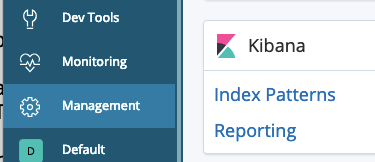
Create index pattern을 누르면 Define index pattern 라는 입력창이 나온다.- LogStash에서 output으로 나오게 한 index 종류들이 나오는데 묶어서 볼 것 로그들의 패턴을 입력한다.
[IMAGE: https://cdn-images-1.medium.com/max/1600/1*kh5owPaaRiPlF1WLL80vkQ.png]
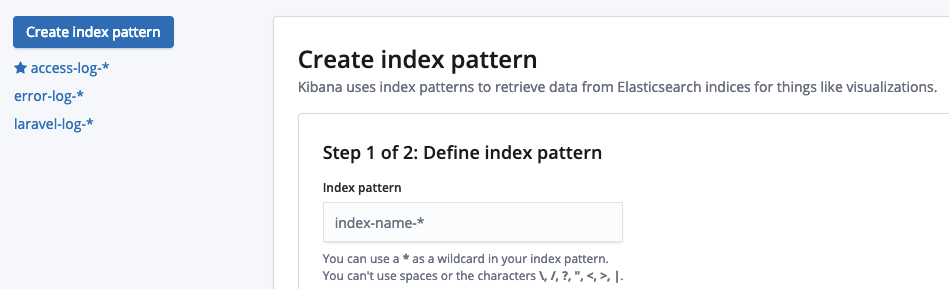
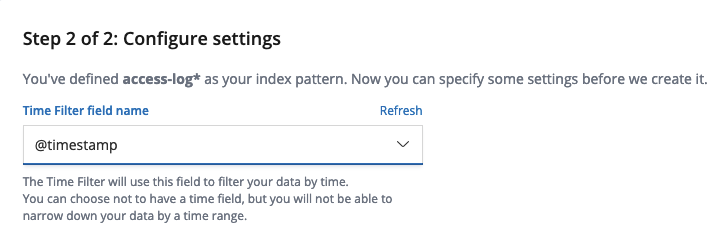
access-log-*과 같은 형식으로 입력하면 access log만 모아서 볼 수 있다.- 패턴 입력 후 Next step을 누르면 Time Filter field name을 선택하는 화면이 나오는데,
@timestamp를 선택한다.
[IMAGE: https://cdn-images-1.medium.com/max/1600/1*ItEpiuKYAWiep9BfUNeD-w.png]
데이터 탐색하기
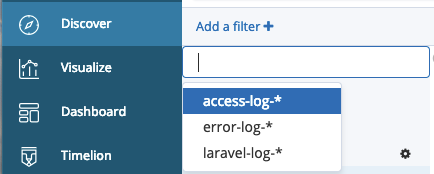
- 좌측 메뉴 Discover에 들어가서, Add a filter + 밑의 드롭다운 메뉴에서 만들어 놓은 인덱스를 선택한다.
[IMAGE: https://cdn-images-1.medium.com/max/1600/1*hibVLiU56lDnKIVtgRU6qw.png]
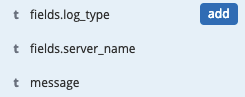
- 보고 싶은 필드를 확인하고 add 버튼을 눌러서 해당 필드만 볼 수 있도록 한다.
- filebeat 설정에서 추가했던 fields.log_type, fields.server_name가 있는 것을 확인할 수 있다.
[IMAGE: https://cdn-images-1.medium.com/max/1600/1*VsDzXRchQXLPvrMNMznJwg.png]
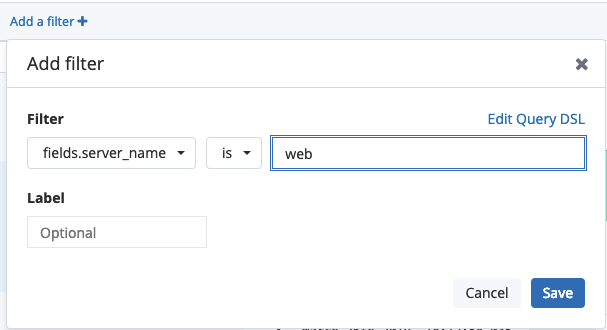
- 해당 데이터 중 특정 값을 필터링하려면 Add a filter + 버튼을 눌러서 특정 필드를 선택하고 is, is not 등을 선택하고 원하는 값을 입력한다.
[IMAGE: https://cdn-images-1.medium.com/max/1600/1*XQePR1V53A8YN5GhDGBiEQ.png]
- 상단의 Save 버튼을 눌러서 필터링 된 결과를 저장한다.
그래프 만들기
- 좌측의 Visualize 메뉴를 선택하고 + 버튼을 누른다.
- 원하는 시각화 컴포넌트 종류를 선택한다.
[IMAGE: https://cdn-images-1.medium.com/max/1600/1*hIuDZjV-hQ00ms1SEmLa3A.png]
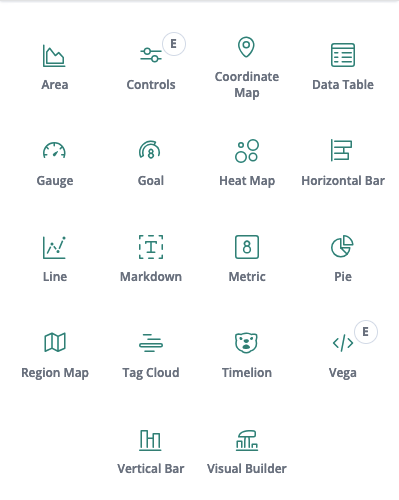
- Horizontal Bar를 선택한 경우
[IMAGE: https://cdn-images-1.medium.com/max/1600/1*ASbMrOkjojrPsUSJJhsFxA.png]
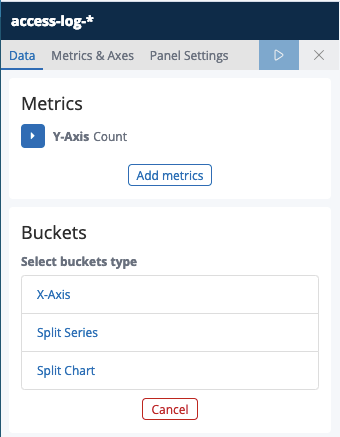
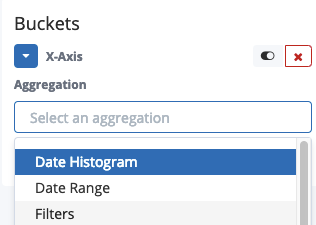
- Buckets > X-Axis를 클릭하고, Aggregation에서 Filters를 선택한다.
[IMAGE: https://cdn-images-1.medium.com/max/1600/1*Xuo16rL2QVQCC_n9ib5fRQ.png]
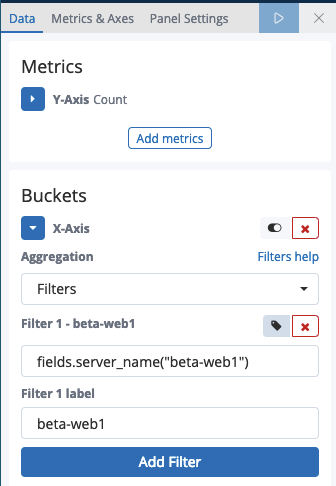
- Add filter를 눌러서 filter, filter label을 입력하고 상단의 ▶︎ 버튼을 눌러서 오른쪽에서 미리보기를 확인한다.
[IMAGE: https://cdn-images-1.medium.com/max/1600/1*Xs7IVO3ym_c3FQIpHH7qVw.png]
- 상단의 Save를 눌러서 시각화 한 화면을 저장한다.
대시보드 구성하기
- 좌측 메뉴에 Dashboard를 선택하고 Create new dashboard 눌러서 새로운 대시보드 화면을 만든다.
- 상단의 Add를 누르면 데이터 탐색하기, 그래프 만들기 에서 저장 한 시각화 검색 결과를 불러올 수 있다.
[IMAGE: https://cdn-images-1.medium.com/max/1600/1*g2UHFJduHyF-STjUSsG9yA.png]
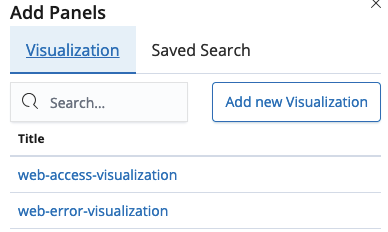
- 원하는 구성을 만든 후 저장한다.
트러블 슈팅
JAVA 버전 문제
Unrecognized VM option 'UseParNewGC'
Error: Could not create the Java Virtual Machine.
Error: A fatal exception has occurred. Program will exit.
chmod: cannot access '/etc/default/logstash': No such file or directory
-
github에서는 java 11 지원하도록 수정했다고 하는데, 배포판에서는 아직 지원 안하는 듯 https://github.com/elastic/logstash/issues/9316
-
JAVA8 설치 권장
메모리 부족 문제
Java HotSpot(TM) 64-Bit Server VM warning: INFO: os::commit_memory(0x00000000ca660000, 899284992, 0) failed; error='Cannot allocate memory' (errno=12)
디스크 부족 문제
[2019-03-26T04:35:00,614][INFO ][logstash.outputs.elasticsearch] retrying failed action with response code: 403 ({"type"=>"cluster_block_exception", "reason"=>"blocked by: [FORBIDDEN/12/index read-only / allow delete (api)];"})
- 디스크 부족할 경우 발생, 용량을 늘려준다.
- read only로 설정 된 값을 풀어준다.
curl -X PUT "localhost:9200/*/_settings" -H 'Content-Type: application/json' -d'{"index.blocks.read_only_allow_delete": null}'- 오래된 index를 삭제한다.
참고
- Elastic 공식 홈페이지
- Elastic Stack을 이용한 서버 에러 로그 대시보드 만들기
- Filebeat vs. Logstash — The Evolution of a Log Shipper
https://steemitimages.com/DQmWQDjyP5d1RNW3mkCWUkDQ6yh3uDJFUZErPpaKBwKi4gM/iron_modolee.png
* 저는 블록체인 개발사 (주)34일에서 블록체인 엔지니어로 일하고 있습니다.
* 880만 팔로워 전세계 1위 한류 미디어 케이스타라이브(KStarLive)와 함께 만든 한류 플랫폼에서 사용되는 케이스타코인(KStarCoin) 프로젝트를 진행 중입니다. 팬 커뮤니티 활동을 하면서 코인을 얻을 수 있으며, 한류 콘텐츠 구매, 공연 예매, 한국 관광 상품 구매, 기부 및 팬클럽 활동 등에 사용 될 계획입니다.