__________     __ __     __  _______    ________
  / ____/ __ \   / // /    / / / /  _/ |  / / ____/
 / / __/ / / /  / // /_   / /_/ // / | | / / __/
/ /_/ / /_/ /  /__  __/  / __  // /  | |/ / /___
\____/\____/     /_/    /_/ /_/___/  |___/_____/

 --- A GOPHER-LIKE INTERFACE FOR HIVE BLOCKCHAIN ---

USING STEEM ENGINE TO WITHDRAW HIVE - A HOW TO

BY: @riverflows | CREATED: May 23, 2020, 2:24 p.m. | VOTES: 183 | PAYOUT: $16.63 | [ VOTE ]

Phew, two weeks is a LONG TIME in HIVE world. In the last few days I hear there has been quite the drama with stolen funds over at Steem. I can't wait to get all my Steem powered down and converted to HIVE, and was happily doing this with IONOMY until they stopped Steem transactions too. Someone said it was easy enough to do it on Steem Engine, so off I went to figure it out. I thought some of my followers might find this post useful, as I would have had I seen a post that talked me through it. For all I know, there are many of them - I haven't had any time to HIVE to see! Now I'm back with WIFI, I have some catching up to do - and the first is catching up with funds and the like.

[IMAGE: https://files.peakd.com/file/peakd-hive/riverflows/sgqNFojh-image.png]

HOW TO TRANSFER STEEM TO HIVE, AND GET IT IN YOUR HIVE WALLET

I have 347 STEEM in my STEEM account that I would like to transfer to HIVE and my HIVE account.

1 Go to Steem Engine and sign in to your account.
2 Then, go to TOKEN WALLET and click 'deposit', then 'get deposit info', and in the box, type how much STEEM you want converted to STEEMP.

[IMAGE: https://files.peakd.com/file/peakd-hive/riverflows/um1fz3rd-image.png]
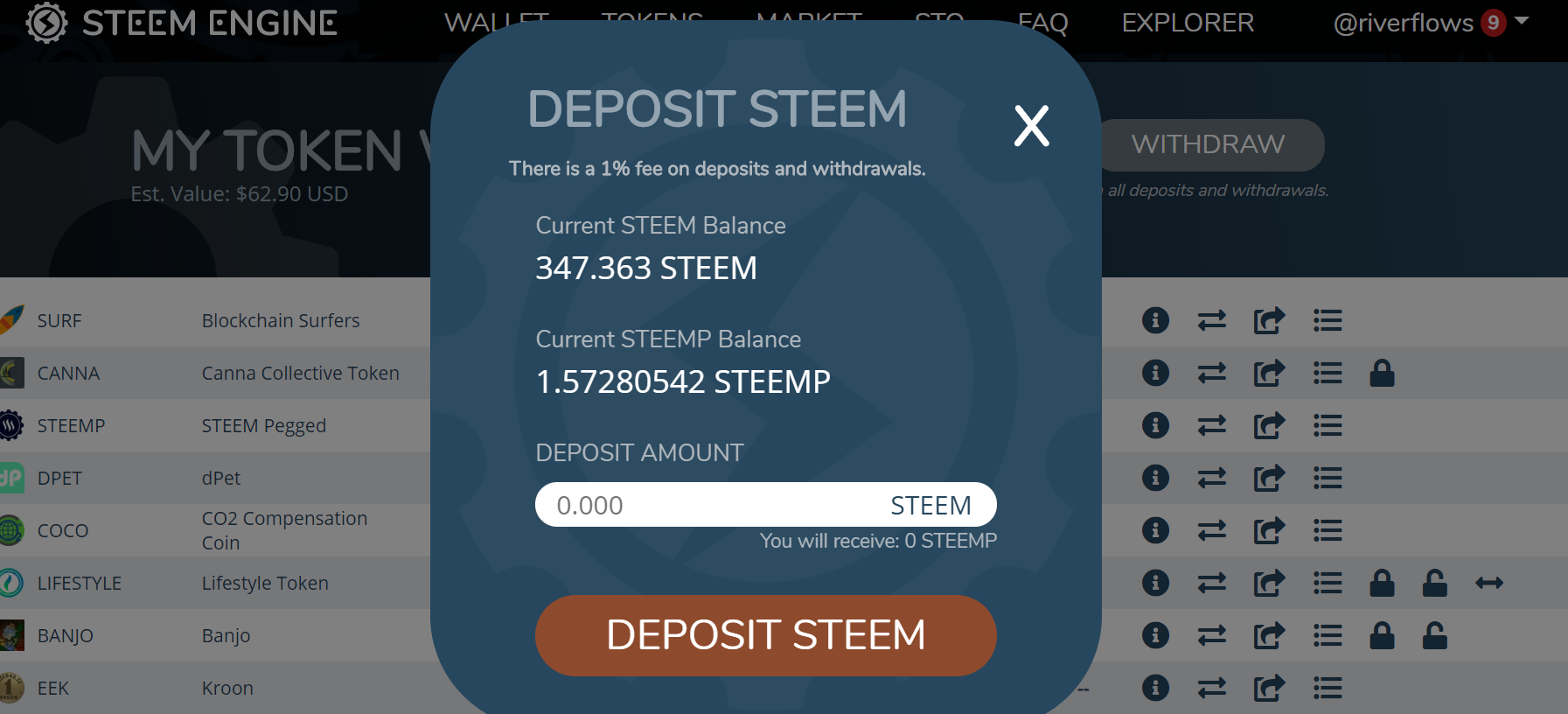
3 Next, go to MARKET. On the left hand side, you will see HIVEP. Click on that. Then you can key in the amount of HIVE you'd like.

[IMAGE: https://files.peakd.com/file/peakd-hive/riverflows/zOeOOTzh-image.png]
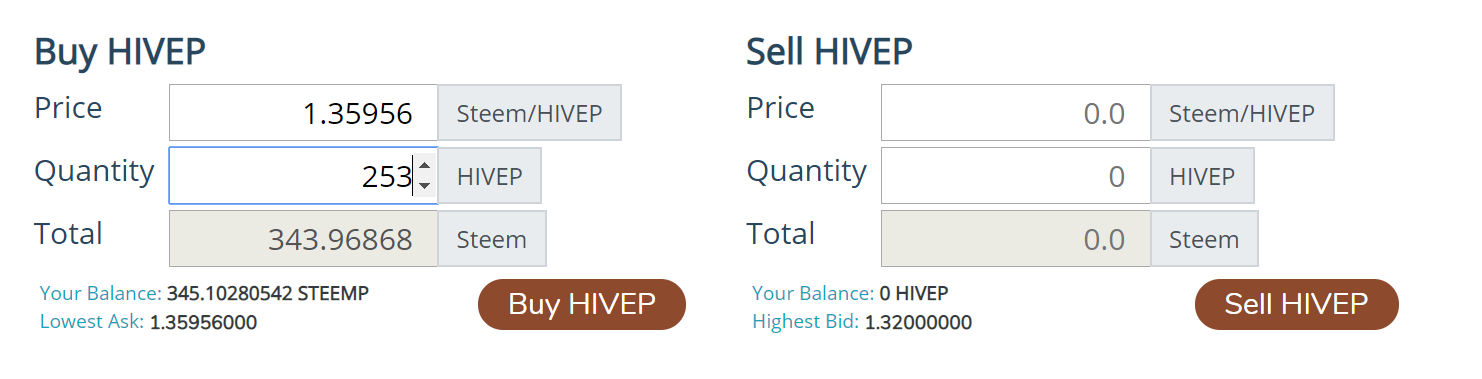
4 The next thing to do is get your HIVE to your HIVE account. In your token wallet, click withdraw. Note how I filled out the fields in the example below. That will send it to steem-tokens account.

[IMAGE: https://files.peakd.com/file/peakd-hive/riverflows/VGuH3ado-image.png]
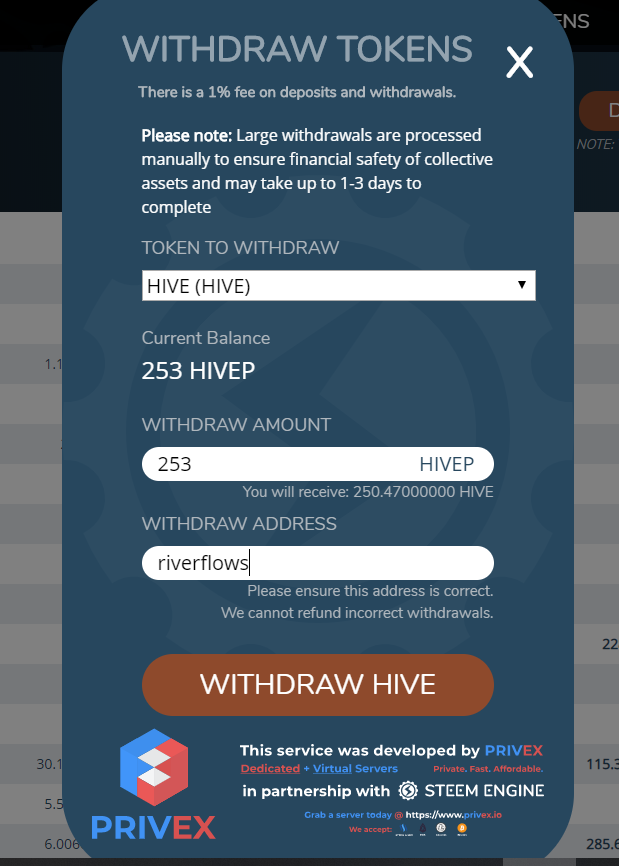
5 Now, go to your HIVE wallet. Don't panic. It can take a while, so don't stress. Refresh the page after you make yourself a cup of tea or go comment on #naturalmedicine content. You'll then see this appear in the transcations:

[IMAGE: https://files.peakd.com/file/peakd-hive/riverflows/X2i4wTB5-image.png]

Again, don't panic. It can take a short while to appear in your HIVE tokens, but it will.

Let me know how you go with this process if you try it! If you need a hand, contact me on Discord. Don't forget to add your active key to Steem keychain or it won't work. Good luck!

With Love,

https://gateway.ipfs.io/ipfs/QmcGSZxvsXD8YbSCNAo6KWc4a9RjXyRCjWupZdPXJapkXk

Join The Best Natural Health Community on Hive

PeakD - The Best Way to Experience The Hive Blockchain

https://files.peakd.com/file/peakd-hive/naturalmedicine/g8iI4wLg-MINDFULLIFE.png
MINDFUL LIFE is a Natural Medicine project which supports meditators on HIVE
Discord II Community

[IMAGE: https://files.peakd.com/file/peakd-hive/riverflows/X7dkN06A-B69zEhWZA8UBvwpPuizsfz2BSKyPpR2EfU2NDGY4pk6pYwLTXrfrBEsJdVUC3NKHw9YrwE9gpFAF5s9e8rtVcFn8KaTQYgZ46VXocUv2.png]

Creating Abundance on Hive

[IMAGE: https://files.peakd.com/file/peakd-hive/riverflows/Ga2TQnqp-image.png]

TAGS: [ #hive ] [ #hivehelp ] [ #crypto ] [ #help ] [ #posh ] [ #ocd ] [ #tokens ]

Replies

@joetunex | May 23, 2020, 2:55 p.m. | Votes: 0 | [ VOTE ]

Thanks for sharing, very helpful.

@riverflows | May 23, 2020, 3 p.m. | Votes: 0 | [ VOTE ]

No worries, hope it works for you xx

@joetunex | May 23, 2020, 3:13 p.m. | Votes: 1 | [ VOTE ]

It worked, I just tested the with 6 Hive 😃

@riverflows | May 24, 2020, 1:07 p.m. | Votes: 0 | [ VOTE ]

Awesome, thanks for letting me know x

@joetunex | May 24, 2020, 1:27 p.m. | Votes: 0 | [ VOTE ]

You are welcome ☺

@oldtimer | May 23, 2020, 3:24 p.m. | Votes: 0 | [ VOTE ]

What if you want to sell 10K STEEM.
There's no liquidity on SE.

@russia-btc | May 23, 2020, 3:41 p.m. | Votes: 0 | [ VOTE ]

I withdraw through the Huobi exchange

@oldtimer | May 23, 2020, 3:54 p.m. | Votes: 0 | [ VOTE ]

I usually did. I wasn't sure if it's still working.

@riverflows | May 23, 2020, 4:40 p.m. | Votes: 0 | [ VOTE ]

I hope you get a good rate that way x

@riverflows | May 23, 2020, 4:40 p.m. | Votes: 0 | [ VOTE ]

I'm sorry, I don't know about that. I'm powering down and selling it as I do so, in lots of around 350 Steem. Can't wait til it's all powered down!

@oldtimer | May 23, 2020, 5:05 p.m. | Votes: 0 | [ VOTE ]

Huobi still works, so I'm good.😀

@vincentnijman | May 24, 2020, 3:56 p.m. | Votes: 0 | [ VOTE ]

Very helpful indeed. Thank you for taking the time to compose this so I didn't need to break my brain over yet another thing ;<)

😘

@riverflows | May 25, 2020, 5:51 a.m. | Votes: 0 | [ VOTE ]

You are welcome honey x

@vincentnijman | May 25, 2020, 8:12 a.m. | Votes: 0 | [ VOTE ]

Honey is always welcome too ;<)

@vincentnijman | May 27, 2020, 3:20 p.m. | Votes: 0 | [ VOTE ]

Honey is always welcome ( insert Hive joke here )

@nickyhavey | May 25, 2020, 6:43 p.m. | Votes: 0 | [ VOTE ]

Nice one! Thanks a lot for sharing this, just transferred over 755 Hive from Steem now 😃

[IMAGE: https://files.peakd.com/file/peakd-hive/nickyhavey/tbLcyTIh-image.png]

@riverflows | May 27, 2020, 8:17 p.m. | Votes: 0 | [ VOTE ]

WOOT!!!!!!! I'm glad you were helped by this - awesome!!!![IMAGE: https://i.imgur.com/XsrNmcl.png]

@nickyhavey | May 27, 2020, 9:07 p.m. | Votes: 0 | [ VOTE ]

Yeahhhhh! Ship that steem out and put it to use here on Hive 😃

@localgrower | May 27, 2020, 11:32 a.m. | Votes: 0 | [ VOTE ]

Thanks for the help! Glad to be part of the @naturalmedicine community & discord also!

@gabrielatravels | May 28, 2020, 1:08 p.m. | Votes: 0 | [ VOTE ]

Great tutorial! Thanks for this! Will transfer my steem to hive very soon using your guide :D

@plantstoplanks | May 28, 2020, 1:20 p.m. | Votes: 0 | [ VOTE ]

I used this yesterday to convert my latest powerdown. Worked like a charm. Thanks for sharing!

[ BACK TO TRENDING ] [ BACK TO MENU ]
CMD>
