Introduction
The following is how I personally setup my Linux server.
When I first connect to a server, the first three things I do are setup vimrc, bash_profile, and screenrc (after installing screen, of course).
Why?
- vimrc: lets me understand and edit scripts better
- bash_profile: to make my bash console look better
- screenrc: lets my screen-using experience more satisfying
1. My ~/.vimrc looks as follows:
You can just copy and paste the text below.
Note that it's better to paste the text in after putting in the :paste command,
else you'll have to deal with deleting a shit lot of comment deleting and reformatting afterwards.
set nocp
" Vim5 and later versions support syntax highlighting. Uncommenting the next
" line enables syntax highlighting by default.
if has("syntax")
  syntax on
endif

" ts=4 sts=4 sw=4 si et ai smarttab
" Customizing tabs
set shiftwidth=4 softtabstop=4 tabstop=4
set si et ai

" Press space to clear search highlighting and any message already displayed.
set hlsearch
nnoremap   :silent nohecho

" Change default DarkBlue comment_color to LightBlue
hi Comment ctermfg=LightBlue
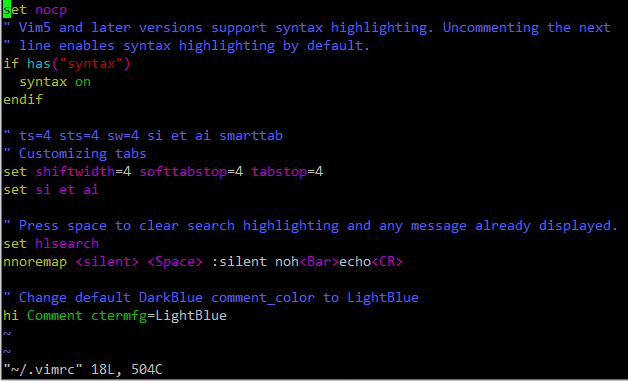
A quick vim peek after editing the vimrc and opening up a python script:
[IMAGE: https://steemitimages.com/DQmXWA5JU3dWQSfTkL8NXw7RkG55MPEoBTLQ94VcR11UZYj/image.png]
2. My ~/.bash_profile looks as follows:
You can just copy and paste the text below.
Note again that it's better to paste the text in after putting in the :paste command,
else you'll have to deal with deleting a shit lot of comment deleting and reformatting afterwards.
# .bashrc

# Source global definitions
if [ -f /etc/bashrc ]; then
  . /etc/bashrc
fi

# are we an interactive shell?
if [ "$PS1" ]; then
  if [ -z "$PROMPT_COMMAND" ]; then
  case $TERM in
  xterm*)
  if [ -e /etc/sysconfig/bash-prompt-xterm ]; then
  PROMPT_COMMAND=/etc/sysconfig/bash-prompt-xterm
  else
  PROMPT_COMMAND='printf "\033]0;%s@%s:%s\007" "${USER}" "${HOSTNAME%%.*}" "${PWD/#$HOME/~}"'
  fi
  ;;
  screen)
  if [ -e /etc/sysconfig/bash-prompt-screen ]; then
  PROMPT_COMMAND=/etc/sysconfig/bash-prompt-screen
  else
  PROMPT_COMMAND='printf "\033]0;%s@%s:%s\033\\" "${USER}" "${HOSTNAME%%.*}" "${PWD/#$HOME/~}"'
  fi
  ;;
  *)
  [ -e /etc/sysconfig/bash-prompt-default ] && PROMPT_COMMAND=/etc/sysconfig/bash-prompt-default
  ;;
  esac
  fi
  # Turn on checkwinsize
  shopt -s checkwinsize
  [ "$PS1" = "\\s-\\v\\\$ " ] && PS1="[\u@\h \W]\\$ "
  # You might want to have e.g. tty in prompt (e.g. more virtual machines)
  # and console windows
  # If you want to do so, just add e.g.
  # if [ "$PS1" ]; then
  # PS1="[\u@\h:\l \W]\\$ "
  # fi
  # to your custom modification shell script in /etc/profile.d/ directory
fi

if ! shopt -q login_shell ; then # We're not a login shell
  # Need to redefine pathmunge, it get's undefined at the end of /etc/profile
  pathmunge () {
  case ":${PATH}:" in
  *:"$1":*)
  ;;
  *)
  if [ "$2" = "after" ] ; then
  PATH=$PATH:$1
  else
  PATH=$1:$PATH
  fi
  esac
  }

  # By default, we want umask to get set. This sets it for non-login shell.
  # Current threshold for system reserved uid/gids is 200
  # You could check uidgid reservation validity in
  # /usr/share/doc/setup-*/uidgid file
  if [ $UID -gt 199 ] && [ "`id -gn`" = "`id -un`" ]; then
  umask 002
  else
  umask 022
  fi
  # Only display echos from profile.d scripts if we are no login shell
  # and interactive - otherwise just process them to set envvars
  for i in /etc/profile.d/*.sh; do
  if [ -r "$i" ]; then
  if [ "$PS1" ]; then
  . "$i"
  else
  . "$i" >/dev/null 2>&1
  fi
  fi
  done

  unset i
  unset pathmunge
fi
# vim:ts=4:sw=4

# some more ls aliases
alias ls='ls --color'
alias ll='ls -alF'
alias la='ls -A'

LS_COLORS='di=00;94:fi=0:ln=31:pi=5:so=5:bd=5:cd=5:or=31:mi=0:ex=35:*.rpm=90'
export LS_COLORS
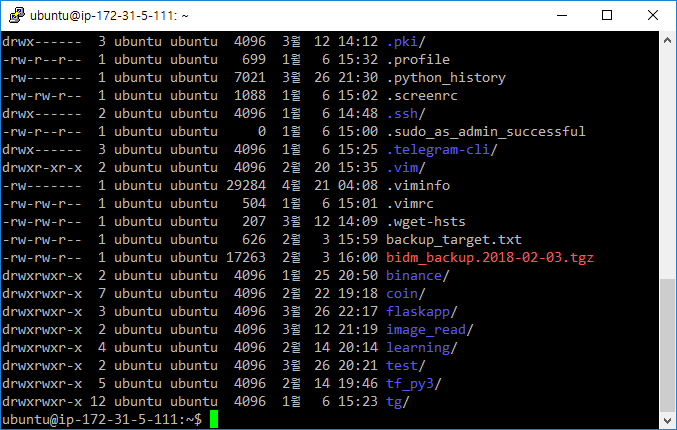
A quick linux console peek after editing the bash_profile and opening up a session (or type in . ~/.bash_profile):
[IMAGE: https://steemitimages.com/DQmNMDDqxTeMUHyZVhS1nRpZouWPBKaEmfnu6ER26ezzMaC/image.png]
3. My ~/.screenrc looks as follows (got it from a post made by Christian Wills - cwills.sys@gmail.com):
You can just copy and paste the text below.
Note that it's better to paste the text in after putting in the :paste command,
else you'll have to deal with deleting a shit lot of comment deleting and reformatting afterwards.
# GNU Screen - main configuration file
# All other .screenrc files will source this file to inherit settings.
# Author: Christian Wills - cwills.sys@gmail.com

# Allow bold colors - necessary for some reason
attrcolor b ".I"

# Tell screen how to set colors. AB = background, AF=foreground
termcapinfo xterm 'Co#256:AB=\E[48;5;%dm:AF=\E[38;5;%dm'

# Enables use of shift-PgUp and shift-PgDn
termcapinfo xterm|xterms|xs|rxvt ti@:te@

# Erase background with current bg color
# defbce "on"

# Enable 256 color term
term xterm-256color

# Cache 30000 lines for scroll back
defscrollback 30000

# New mail notification
# backtick 101 30 15 $HOME/bin/mailstatus.sh

hardstatus alwayslastline
# Very nice tabbed colored hardstatus line
hardstatus string '%{= Kd} %{= Kd}%-w%{= Kr}[%{= KW}%n %t%{= Kr}]%{= Kd}%+w %-= %{KG} %H%{KW}|%{KY}%101`%{KW}|%D %M %d %Y%{= Kc} %C%A%{-}'

# change command character from ctrl-a to ctrl-b (emacs users may want this)
#escape ^Bb

# Hide hardstatus: ctrl-a f
bind f eval "hardstatus ignore"
# Show hardstatus: ctrl-a F
bind F eval "hardstatus alwayslastline"
A quick linux console peek after editing the screenrc and opening up a screen session (to start a new session I put inscreen -R some_screen_name; to open a previous session I put in screen -x some_screen_name):
Since my server's language was configured as ko_KR.UTF-8, the weekday and month are shown in korean (토: Saturday, 월: Month)
[IMAGE: https://steemitimages.com/DQmSBoQtKjjBRpnWwyQqva8iKjUJn8gsaj7U2fLntTHSf3X/image.png]

Hope this helps! 😸


