+-+-+ +-+ +-+-+-+-+
|G|O| |4| |H|I|V|E|
+-+-+ +-+ +-+-+-+-+

 --- A GOPHER-LIKE INTERFACE FOR HIVE BLOCKCHAIN ---

How to build an API using Python and Flask (Example showing Steem-Buddy API)

BY: @tarekadam | CREATED: July 18, 2017, 9:37 a.m. | VOTES: 44 | PAYOUT: $10.12 | [ VOTE ]

Building an API to fetch data from the steem blockchain is actually easier than you might think. The easiest way I found and used to build the Steem-Buddy API is Python and Flask.

Flask is a micro web framework (a fancy word that actually means the handling of http requests) which allows you with just a few lines of python code to build an API (application programming interface).
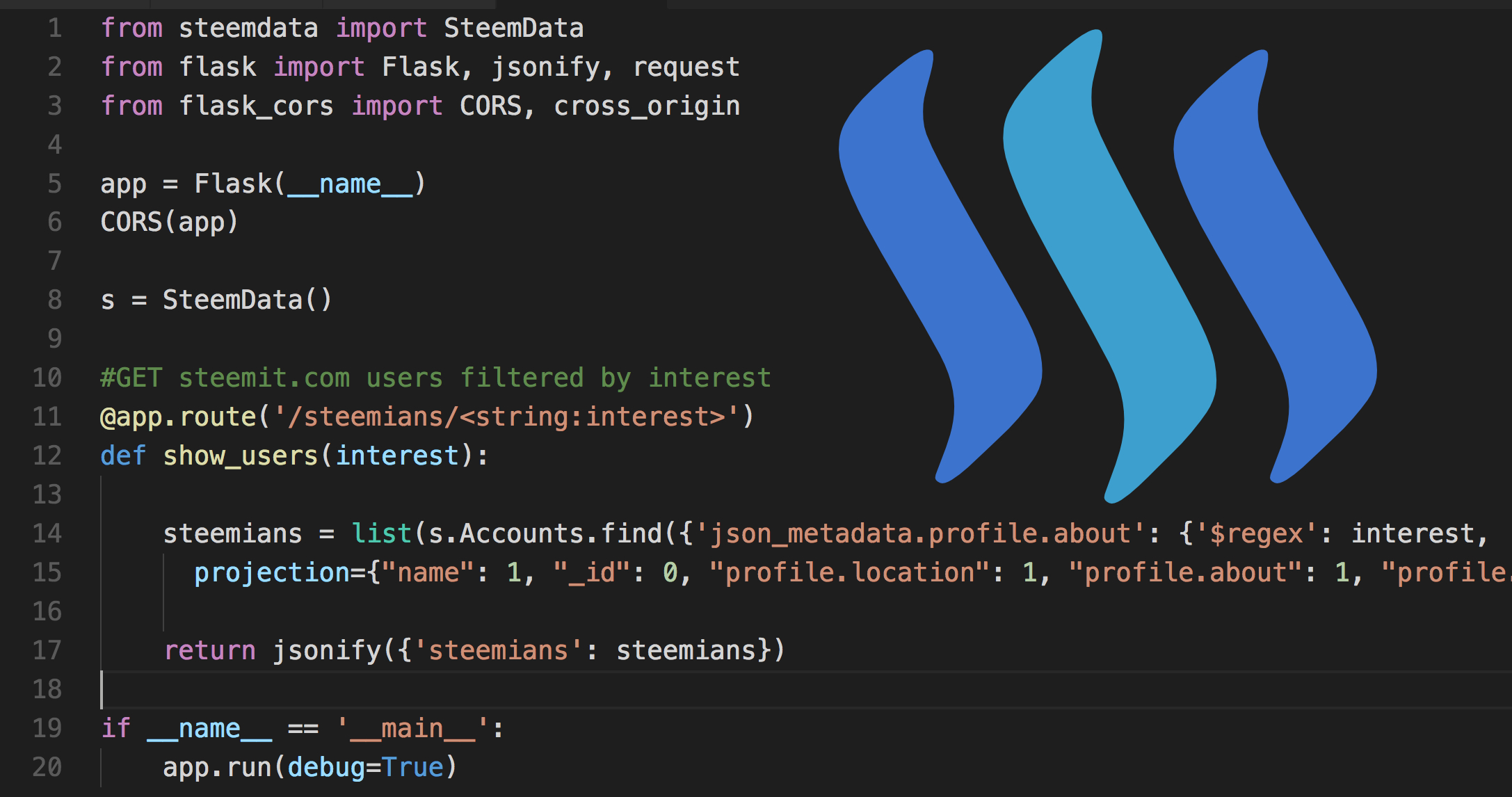
[IMAGE: https://steemitimages.com/DQmW1E1ozgVQ4TPiqSW1dDszVZVo87Cq5XrdXLKGAMMTpRA/Screen%20Shot%202017-07-18%20at%2011.19.27.jpg]

Below is the complete Flask / Python code that runs my Steem-Buddy API on Heroku.
I am not an expert in python and Flask but will do my best to explain each line as accurate as possible.

from steemdata import SteemData

This line imports the SteemData helper library created by @furion. This library is required to easily access SteemData, a Mongo Database that contains steem blockchain information.

from flask import Flask, jsonify, request

The heart of the application. Flask is imported hear. In Addition we add the jsonify which is needed to return and display the fetched data in JSON format.

from flask_cors import CORS, cross_origin

This line is very important since it is needed to allow cross origin requests. I spent one whole day to figure out why I can't get my JSON data displayed on my front end hosted on AWS. This single line of code was needed to fix it!

app = Flask(__name__)

Initiate Flask app

CORS(app)

Initiate CORS extension

s = SteemData()

Declare variable "s" as SteemData database

#GET steemit.com users filtered by interest
@app.route('/steemians/')
def show_users(interest):

Initiate Flask Route with interest input and start show_users function which expects interest input.

steemians = list(s.Accounts.find({'json_metadata.profile.about': {'$regex': interest, '$options': "i"}},
projection={"name": 1, "_id": 0, "profile.location": 1, "profile.about": 1, "profile.profile_image": 1}))

Mongo DB query that looks for a matching interest in the profile.about key. In order to be efficient with the bandwidth I use projection to only get certain information like name, about, location and image.

return jsonify({'steemians': steemians})

Return the data in JSON format in order for my front end (Vue.js) to handle the data.

if __name__ == '__main__':
app.run(debug=True)

Run the Flask app if no errors found.

That's it, 16 lines of code to create an API.

Give it a try and create some great apps we can use!

TAGS: [ #programming ] [ #python ] [ #steemdef ] [ #blockchain ] [ #steemdata ]

Replies

@payal | July 18, 2017, 9:41 a.m. | Votes: 1 | [ VOTE ]

@tarekadam thanks for sharing very informative post. I will definitely give it a try.

@tarekadam | July 18, 2017, 9:43 a.m. | Votes: 0 | [ VOTE ]

Thank you, let me know once your api is ready.

@bugavi | July 18, 2017, 11:32 a.m. | Votes: 0 | [ VOTE ]

Wow! You did good post my friend @terekadam and interesting article! Look on my post! I posting very interesting crazy video! But today is special issue 2 video in 1 post! Looks please! https://steemit.com/funny/@bugavi/crazy-video-of-the-day-from-crazy-bugavi-7-special-issue-2-video-in-1-post

@blazing | July 18, 2017, 12:37 p.m. | Votes: 1 | [ VOTE ]

Thank you for all these step by step post might come handy to me :D

@rtdcs | July 18, 2017, 1:13 p.m. | Votes: 1 | [ VOTE ]

Thanks for sharing this great post my friend!

@hackerwhacker | July 18, 2017, 4:47 p.m. | Votes: 1 | [ VOTE ]

Does it work on windows?

@tarekadam | July 18, 2017, 6:53 p.m. | Votes: 0 | [ VOTE ]

Eventually you need to upload the python file to a server like Heroku but you can code it on every platform :-)

@hackerwhacker | July 18, 2017, 8:36 p.m. | Votes: 0 | [ VOTE ]

well I am gonna write one that works for windows.

@machhour | July 18, 2017, 6:53 p.m. | Votes: 1 | [ VOTE ]

thank you so much for this another great informative post:)

@lichtblick | July 19, 2017, 7:12 a.m. | Votes: 1 | [ VOTE ]

Upvoted and resteemed :-)

@tarekadam | July 19, 2017, 7:26 a.m. | Votes: 1 | [ VOTE ]

Thank you very much @lichtblick

@lichtblick | July 19, 2017, 7:27 a.m. | Votes: 0 | [ VOTE ]

You are very welcome @tarekadam :-)

@nphacker | July 19, 2017, 9:03 p.m. | Votes: 1 | [ VOTE ]

Great tutorial! I've built https://steemiq.me in a very similar manner, I essentially get a user's posts and run some text analytics to find out what their Flesch-Kincaid grade level score is (this is roughly analogous to school grade).

@tarekadam | July 20, 2017, 6:07 a.m. | Votes: 1 | [ VOTE ]

Your site is awesome! I like to reach that level also one day. One thing I noticed is that in your calculation you include posts that are resteemed and therefore not necessarily reflect the own writing.

@nphacker | July 21, 2017, 5:06 p.m. | Votes: 1 | [ VOTE ]

Good call! Totally missed that, when I first made the site there was no such thing as resteeming, I'll probably have to account for this in the code. Thanks for the heads up!

@tarekadam | July 21, 2017, 8:20 p.m. | Votes: 0 | [ VOTE ]

You are doing great.

@vidallia | July 20, 2017, 11:14 p.m. | Votes: 2 | [ VOTE ]

Thanks so much for this! I've been trying to figure the easiest route to interact with the steemit api using python.

[ BACK TO TRENDING ] [ BACK TO MENU ]
CMD>