[IMAGE: https://cdn.steemitimages.com/DQmQt8EhaAMsDyfUiZvBnvfXZvi62vkTmiww4siZ1QPmBfW/image.png]
Repository
https://github.com/flutter/flutter
What Will I Learn?
- You will learn how to record sound with Flutter
- You will learn how to setup an Android emulator to use the PC microphone
- You will learn how to use the speech recognizer plugin for Flutter
- You will learn how to interact with the Platform Messages from Android and iOS
- You will learn how to override internationalization with this plugin
Requirements
System Requirements:
- IDEA intellij, Visual Studio Code with the Dart/Flutter Plugins, Android Studio or Xcode
- The Flutter SDK on the latest Master Build
- An Android or iOS Emulator or device for testing
OS Support for Flutter:
- Windows 7 SP1 or later (64-bit)
- macOS (64-bit)
- Linux (64-bit)
Required Knowledge
- A basic knowledge Programming
- A fair understanding of Mobile development and Imperative or Object Oriented Programming
- Basic knowledge of dependencies
Resources for Flutter and this Project:
- Flutter Website: https://flutter.io/
- Flutter Official Documentation: https://flutter.io/docs/
- Flutter Installation Information: https://flutter.io/get-started/install/
- Flutter GitHub repository: https://github.com/flutter/flutter
- Flutter Dart 2 Information: https://github.com/flutter/flutter/wiki/Trying-the-preview-of-Dart-2-in-Flutter
- Flutter Technical Overview: https://flutter.io/technical-overview/
- Dart Website: https://www.dartlang.org/
- Flutter Awesome GitHub Repository: https://github.com/Solido/awesome-flutter
- The Flutter Provider Library: https://github.com/rrousselGit/provider
- Pub website: https://pub.dartlang.org
Sources:
Flutter Logo (Google): https://flutter.io/
Difficulty
- Intermediate
Description
In this Flutter Video Tutorial, we build a simple Text to Speech/Speech Recognizer application using the Speech Recognizer Flutter Plugin. The application takes in speech from a microphone on the Phone. It them passes that sound to the platform layer of the current phone. This sound is passed through an existing iOS or Android API and then translated to text. Its then passed back to the flutter layer of the application. We put this text into a box and display it to the user.
Sending and Receiving Platform Messages With Flutter
For the functionality of this application to work properly, the plugin needs to fully make use of Platform Messages and Channels. These Platform Messages provide us with a simple mechanism for communicating with platform specific APIs from iOS and Android. In this case, we are communicating with the speech recognition API that is a part of both platforms. For this to work properly, we need to define a bunch of callback functions for what our app should do in response to receiving and sending messages back and forth between the platforms.
[IMAGE: https://cdn.steemitimages.com/DQmU6Wa2cLyTkgQSqPraUV7tKUed91i1bgnW2ofsyVKCQJ2/flutter-platform.png]
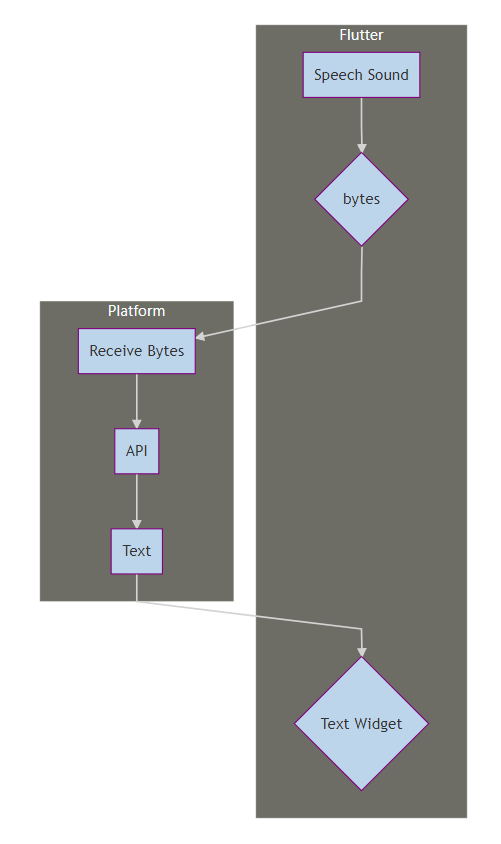
The above flowchart gives us a decent idea of how the flow of the application works in this case. Speech comes in through the microphone of the phone or computer. This speech is digitized into bytes and passed back to the platform. The platform feeds it through the API which converts it into text. This text is then returned back to the flutter layer where it is injected into the Text Widget in our UI.
Setting Up the Features for our Application
While the plugin takes care of much of the Platform side logic and we also define a set of callbacks to respond to these Platform channels; we need to define the set of features that we want in our application. There are some obvious features like a Play/Record button and a Stop function and there are some less obvious ones like the Cancel Button. The user pushes the Play/Record button to start the record functionality and then they can either press Cancel or Stop to terminate it. Stop maintains the text in the widget while cancel clears the Text Widget.
[IMAGE: https://cdn.steemitimages.com/DQmPFYR1irHZcBbno3kGbp5CurJbveMA2UWjQ6oagGEQ51q/speech-phone.png]
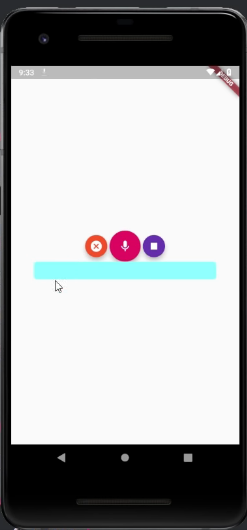
Our three functionalities are tied to the three buttons in our application. The middle button activates the record functionality, the left button activates the cancel functionality and the right button stops recording. The small blue box at the bottom of the buttons is the Text widget and it fills up with the text that is sent back from the platform while the user is speaking.
The Source Code for this video may be found here: https://github.com/tensor-programming/flutter_speech_to_text
Video Tutorial
Curriculum
Projects and Series
> ##### Stand Alone Projects:
> - Dart Flutter Cross Platform Chat Application Tutorial
> - Building a Temperature Conversion Application using Dart's Flutter Framework
> - Managing State with Flutter Flux and Building a Crypto Tracker Application with Dart's Flutter Framework
> ##### Utopian Rocks Example
> - Advanced Flutter Project - Setting Up the Basic Structure - Part One
> - Advanced Flutter Project - Adding a Second BloC - Part Two
> - Advanced Flutter Project - Best Practices - Generic BLoC Providers - Part Three
> - Advanced Flutter Project - Adding Fonts and Fuzzy Timestamps - Part Four
> - Advanced Flutter Project - Filtering Contributions and Building Aesthetics - Part Five
> ##### Building a Calculator
> - Building a Calculator Layout using Dart's Flutter Framework
> - Finishing our Calculator Application with Dart's Flutter Framework
> ##### Movie Searcher Application
> - Building a Movie Searcher with RxDart and SQLite in Dart's Flutter Framework (Part 1)
> - Building a Movie Searcher with RxDart and SQLite in Dart's Flutter Framework (Part 2)
> - Building a Movie Searcher with RxDart and SQLite in Dart's Flutter Framework (Part 3, Final)
> #### Minesweeper Game
> - Building a Mine Sweeper Game using Dart's Flutter Framework (Part 1)
> - Building a Mine Sweeper Game using Dart's Flutter Framework (Part 2)
> - Building a Mine Sweeper Game using Dart's Flutter Framework (Part 3)
> - Building a Mine Sweeper Game using Dart's Flutter Framework (Part 4, Final)
> #### Redux Todo App
> - Building a Todo/CRUD Application In Flutter With Redux - Part 3
> - Building a Todo/CRUD Application In Flutter With Redux - Part 2
> - Building a Todo/CRUD Application In Flutter With Redux - Part 1
> #### RxCommand Weather App
> - Building a Weather Application with Dart's Flutter Framework (Part 1, Handling Complex JSON with Built Code Generation)
> - Building a Weather Application with Dart's Flutter Framework (Part 2, Creating a Repository and Model)
> - Building a Weather Application with Dart's Flutter Framework (Part 3, RxCommand (RxDart) and Adding an Inherited Widget)
> - Building a Weather Application with Dart's Flutter Framework (Part 4, Using RxWidget to Build a Reactive User Interface)
> - Localize and Internationalize Applications with Intl and the Flutter SDK in Dart's Flutter Framework
Curriculum
- Building a Multi-Page Application with Dart's Flutter Mobile Framework
- Making Http requests and Using Json in Dart's Flutter Framework
- Building Dynamic Lists with Streams in Dart's Flutter Framework
- Using GridView, Tabs, and Steppers in Dart's Flutter Framework
- Using Global Keys to get State and Validate Input in Dart's Flutter Framework
- The Basics of Animation with Dart's Flutter Framework
- Advanced Physics Based Animations in Dart's Flutter Framework
- Building a Drag and Drop Application with Dart's Flutter Framework
- Building a Hero Animation and an Application Drawer in Dart's Flutter Framework
- Using Inherited Widgets and Gesture Detectors in Dart's Flutter Framework
- Using Gradients, Fractional Offsets, Page Views and Other Widgets in Dart's Flutter Framework
- Making use of Shared Preferences, Flex Widgets and Dismissibles with Dart's Flutter framework
- Using the Different Style Widgets and Properties in Dart's Flutter Framework
- Composing Animations and Chaining Animations in Dart's Flutter Framework
- Building a Countdown Timer with a Custom Painter and Animations in Dart's Flutter Framework
- Reading and Writing Data and Files with Path Provider using Dart's Flutter Framework
- Exploring Webviews and the Url Launcher Plugin in Dart's Flutter Framework
- Adding a Real-time Database to a Flutter application with Firebase
- Building a List in Redux with Dart's Flutter Framework
- Managing State with the Scoped Model Pattern in Dart's Flutter Framework
- Authenticating Guest Users for Firebase using Dart's Flutter Framework
- How to Monetize Your Flutter Applications Using Admob
- Using Geolocator to Communicate with the GPS and Build a Map in Dart's Flutter Framework
- Managing the App Life Cycle and the Screen Orientation in Dart's Flutter Framework
- Making use of General Utility Libraries for Dart's Flutter Framework
- Interfacing with Websockets and Streams in Dart's Flutter Framework
- Playing Local, Network and YouTube Videos with the Video Player Plugin in Dart's Flutter Framework
- Building Custom Scroll Physics and Simulations with Dart's Flutter Framework
- Making Dynamic Layouts with Slivers in Dart's Flutter Framework
- Building a Sketch Application by using Custom Painters in Dart's Flutter Framework
- Using Dart Isolates, Dependency Injection and Future Builders in Dart's Flutter Framework
- Looking at the Main Features of the Beta Three Release of Dart's Flutter Framework
- Working With gRPC in Flutter on Top of a Go Service
Proof of Work Done
https://github.com/tensor-programming