[IMAGE: https://cdn.steemitimages.com/DQmVq7k7SesVgh7jun87JhmfG9JBcC2gtJUCbngRyMiHCcr/elixir.jpg]

Repository: https://github.com/elixir-lang/elixir
What Will I Learn?
- You will learn the basics of Pattern Matching
- You will learn how to Pattern Match off of Tuples
- You will learn how to Pattern Match on Lists
- You will learn how to destruct data using Pattern Matching
- You will learn how to create multi-clause functions
- You will learn how to use Constants in a Pattern Match
- You will learn about the Pin Operator
Requirements
System Requirements:
- Elixir v1.8 requires Erlang 20.0 or later
OS Support for Elixir and Phoenix:
- Mac OSx
- Unix and Linux
- Windows
- Raspberry Pi
- Docker
Required Knowledge
- Some basic Programming Knowledge
- An Elixir installation
- VsCode or any other Text Editor
Resources for Elixir and Phoenix:
- Elixir Website: https://elixir-lang.org
- Elixir Installation Instructions: https://elixir-lang.org/install.html
- Awesome Elixir Github: https://github.com/h4cc/awesome-elixir
- Phoenix Website: https://phoenixframework.org/
- Phoenix Installation Instructions: https://hexdocs.pm/phoenix/installation.html
- Elixir Documentation: https://elixir-lang.org/docs.html
- Phoenix Documentation: https://hexdocs.pm/phoenix/Phoenix.html
- LiveView Github Repository: https://github.com/phoenixframework/phoenix_live_view
Sources:
- Elixir Image: https://elixir-lang.org
Difficulty
- Beginner
Description
In this Elixir Video tutorial, we introduce the concept of Pattern Matching and we look at examples of both basic Pattern Matching and Complex Pattern Matching. Pattern Matching is a concept that is central to the Elixir language; developers can create functions that have multiple heads and the equals operator (=) is the a match operator not the assignment operator. Mastering this concept of Pattern matching will allow the developer to create robust applications that can respond to structured data.
Pattern Matching on Basic Structures and Types
Pattern matching is an important construct in Elixir. It's a feature that allows developers to manipulate complex values such as Tuples and Lists with ease. It also allows you to write elegant and declarative conditionals and loops. This concept permeates every aspect of the Language from how the datatypes are handled to how the functions are structured in a module.
[IMAGE: https://cdn.steemitimages.com/DQma5a7gKJiaMbeyq5hVE1rwzNt6WyWtuDYSriztXuek3kD/matching.png]
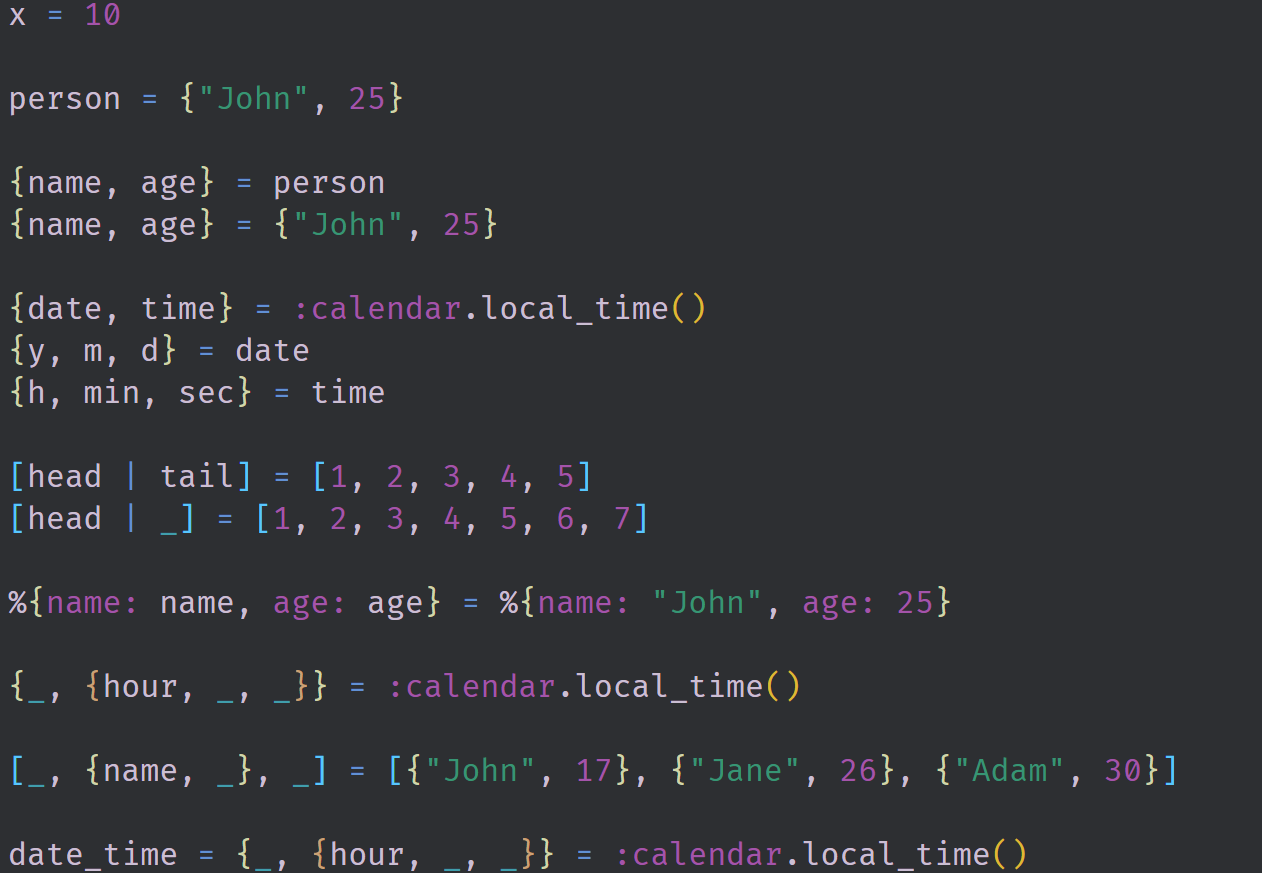
All of the lines in the Above image are pattern matching statements. At runtime, the left side of the = operator is matched to the right side. the left side is called a pattern and the right side is the expression that evaluates to an Elixir term. Our most basic example takes the term 10 and matches it to a variable x. More complex examples allow us to specifically use the structure of the data to our advantage. Calling the :calendar.local_time() function returns a Tuple of two Tuples. Knowing this we are able to bind each of those tuples to their own independent variables date and time. We can then break each of these tuples down into their individual elements by using more pattern matching.
Pattern Matching with Function Clauses
In a more formal sense, Pattern matching is an expression that consists of two parts, the pattern and the term. During the match you can assert you expectations about the right-side term and you may bind some parts of the term to variables from the pattern. This idea can also be applied to functions by way of the function arguments. Each function in Elixir is identified through the function's argument count (arity) and the function name and this allows us to create multiple function causes with the same name and arity.
[IMAGE: https://cdn.steemitimages.com/DQmRS8p3Xe5GkgYHPbst3c4bd85aQoAzWFMuDUmEvKk3Q96/geo-module.png]
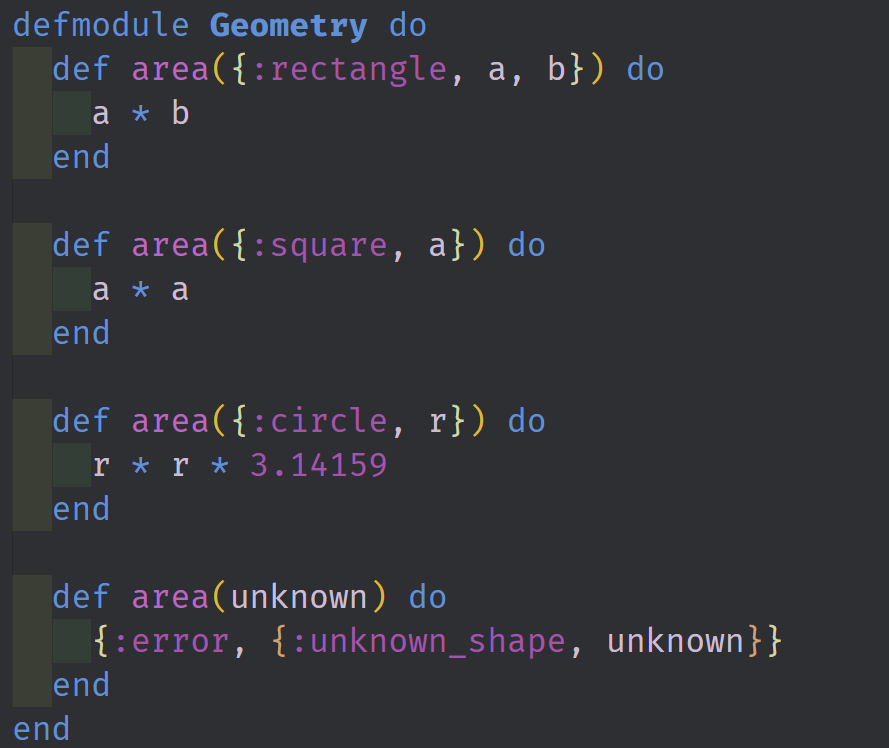
In the above image we have a module defined with a single function inside of it. This function area/1 is a multi-clause function that makes use of pattern matching to determine which clause will execute. The match statement starts from the top and works towards the bottom. First it checks to see if the incoming arguments are inside of a tuple of length 3 and contain a :rectangle atom as the first term. If this is the case then the first clause is executed. It than moves on to the next clause and checks the incoming arguments compared to the parameters of the clause. If none of the first three arguments are matched then the final clause is automatically executed as a catch all. This clause needs to come at the bottom of the module otherwise it will block the other clauses from matching and render the code dead.
Full Github Source Code can be found here: https://github.com/tensor-programming/intro-to-elixir/tree/tensor-programming-part-3
Video Tutorial
Curriculum
Intro to Elixir
- Introduction to Elixir - A Background and the Primitive Types - Part One
- Introduction to Elixir - Functions, Built-in and Complex Types - Part Two
Related Phoenix Videos
> - Phoenix 1.3 Chat Application Tutorial
> - Phoenix 1.3 Contexts and Ecto Schemas
GraphQL Series
> - Phoenix 1.3 GraphQL API - Part 1
> - Phoenix 1.3 GraphQL API - Part 2
> - Phoenix 1.3 GraphQL API - Part 3