[IMAGE: https://steemitimages.com/DQmQFc8Z7rKHjg2yaxMzNt15ZvBesjUzJZ4gCsXUJtaFdto/image.png]
Preface
This isn't a super new feature of Windows 10, but I'm planning on doing some Python-related content in the near future and I figured I'd show you all how I actually do my development work.
There's other great guides out there on how to install this, so I'll not be taking a super detailed look at that. Instead, I'll be linking to different useful resources you can use to get up and running, and I'll even throw in some tips that will really help make things easy.
You will want to have some basic experience with the Bash shell and the Linux filesystem, but you certainly don't have to be a pro. You will probably want to know some basic Python programming too if you want to follow along in my future posts that I'll be doing using Bash on Ubuntu on Windows.
What is the Windows Subsystem for Linux?
The Windows Subsystem for Linux (WSL) is a compatibility layer that allows Linux binary executables run natively in Windows 10. Originally, this feature was released during the Anniversary Update, and only an Ubuntu image was available. The Fall Creators Update added Fedora and Suse images, and made it simple to install the distributions through the Windows Store. Users can use the WSL to run a Linux userland containing things like a Bash shell, Linux command-line tools like grep, sed and awk, and interpreters for programming languages like Python and Ruby.1
You can learn more in the official MSDN documentation here.
Installing Bash on Ubuntu on Windows
Out of the available images, I prefer using Ubuntu simply because it's very familiar and easy. The only other distros I'm very familiar with are Tails and Backtrack 5 (which is now Kali), and neither are suited for the development we want to be doing.
Check for compatibility
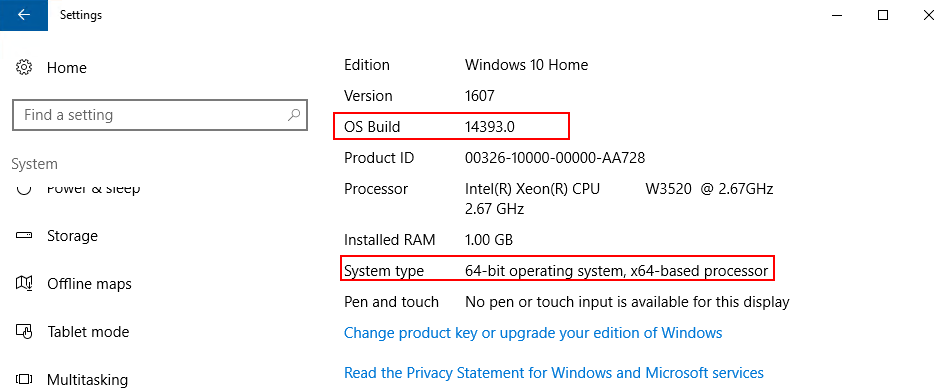
You need to be running a 64-bit version of Windows 10 that is at least the 1607 build or later.
Go to Settings > System > About to check the OS Build and System type fields.
[IMAGE: https://steemitimages.com/DQmbNXVKstcU83bstgYkELBxK8JE6ppyzJwd5Mh47qBKzre/image.png]
Install the Windows Subsystem for Linux
The best directions can be found here.
Remember that your UNIX username and password are unique to the subsystem and are not related to your Windows credentials. The first user account you create is automatically configured to be the default user and to have administrative privileges (member of the sudo group).
Tips & Tricks
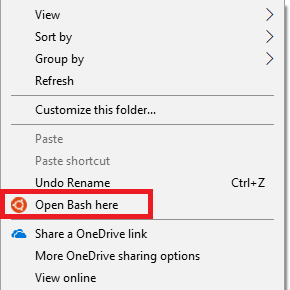
Adding "Open Bash Here" to the context menu
One of the nice little features in Ubuntu is the ability to right-click in any folder and open up a terminal right in that directory. Thankfully, with a bit of registry tweaks, you can do it in Windows too! Remember to back up your registry before making any edits - you can permanently damage your system if you mess up your registry.
[IMAGE: https://steemitimages.com/DQmdMajYewC6kGwYPSFiGYdo8fhKsfyA8pdiGLjEKbQuTft/image.png]
I'm following the guide found here by How-To Geek.
-
Start by opening the registry editor by pressing the Windows key + R and typing regedit.
-
Navigate through the folder tree to
\HKEY_CLASSES_ROOT\Directory\Background\shell, right click theshellfolder and select New > Key. Name the key something recognizable like "bash". -
Select the new key and double-click
(Default)in the right pane. This is where you will enter the text that will be displayed in the context menu, I chose "Open Bash here".
[IMAGE: https://steemitimages.com/DQmS1eQX41B5ahRUgqSyytBrM3yhBHP2fJJvQ9qEN9UrCoW/image.png]

-
(Optional) If you want the Bash icon to show up, right click the
bashentry (or whatever you named it), and choose New > String Value. Name the valueIcon, double-click it, and enter%USERPROFILE%\AppData\Local\lxss\bash.ico. -
Next, create a new key named
commandby right-clicking the bash > New > > Key. Select the new command key and double click(Default)in the right pane. Set the value toC:\Windows\System32\bash.exe.
Navigating the Windows file system in Bash
- Once you have your Bash shell open, you can navigate to
mnt/c/Users/username/Desktopto get to the desktop of a Windows user account. Your drive letter may be different from "c", and you'll have to put in your own username instead of "username".
Copy & pasting to and from Bash
- Copy from the shell: highlight text and hit enter
- Paste into the shell: right-click in the terminal
Updating
apt-get- launches to Linux Package Managersudo apt-get update- refreshes package availabilitysudo apt-get upgrade- upgrades current packagessudo apt-get clean- cleans the apt cache
More tips & tricks
- A ~45 minute video: "30 Tips and Tricks for Managing and Running Ubuntu/Bash/Windows Subsystem for Linux". It gets into a lot of things, but there's a ton of useful information in here for creating virtual desktops, using Linux tools, and much more.
Leave a like or resteem if you found this helpful. You can also support me by sending ETH or ERC20 toeksn to Tomshwom.eth. Leave your thoughts below about what you think and on which content you'd like to see in the future!