___  ___    _ _    _  _ _____   _____
 / __|/ _ \  | | |  | || |_ _\ \ / / __|
| (_ | (_) | |_  _| | __ || | \ V /| _|
 \___|\___/    |_|  |_||_|___| \_/ |___|

 --- A GOPHER-LIKE INTERFACE FOR HIVE BLOCKCHAIN ---

Kinemaster

BY: @xomegax | CREATED: Sept. 2, 2018, 8:46 a.m. | VOTES: 13 | PAYOUT: $0.11 | [ VOTE ]

[IMAGE: https://cdn.steemitimages.com/DQmSbZpDqPVEZeHqRJBkQkEifHq2UMMoiAnGsRGyYWTGJVX/Screenshot_20180821-113716_KineMaster.jpg]

KINEMASTER

So i have been using this video editor for a while now i think for about a year now

Kinemaster is a mobile editor for android it is free to download but once exported includes a small watermark but can be removed with its pro version which includes more features for a monthly fee

I have used kinemaster to compile videos audio and other layers. It is easy to use with almost all the basic features in a pc editor. 

Other editors dont have some of the features kinemaster have like:

Crop

Layering(media,effects,overlay,text and even your own handwriting)

Animations/transitions

Audio extracting

Cutting dividing 

Adding your own voice

Rotating

Clip graphics

Color filter

Color adjusment

Vignette

Audio adjustment

Audio filter

Inserting freeze frame

Looping of audio

Caputuring frames

Speed up and speed down

Ect

It is also easy to preview and export woth it able to export at full hd

TUTORIAL

Starting a project

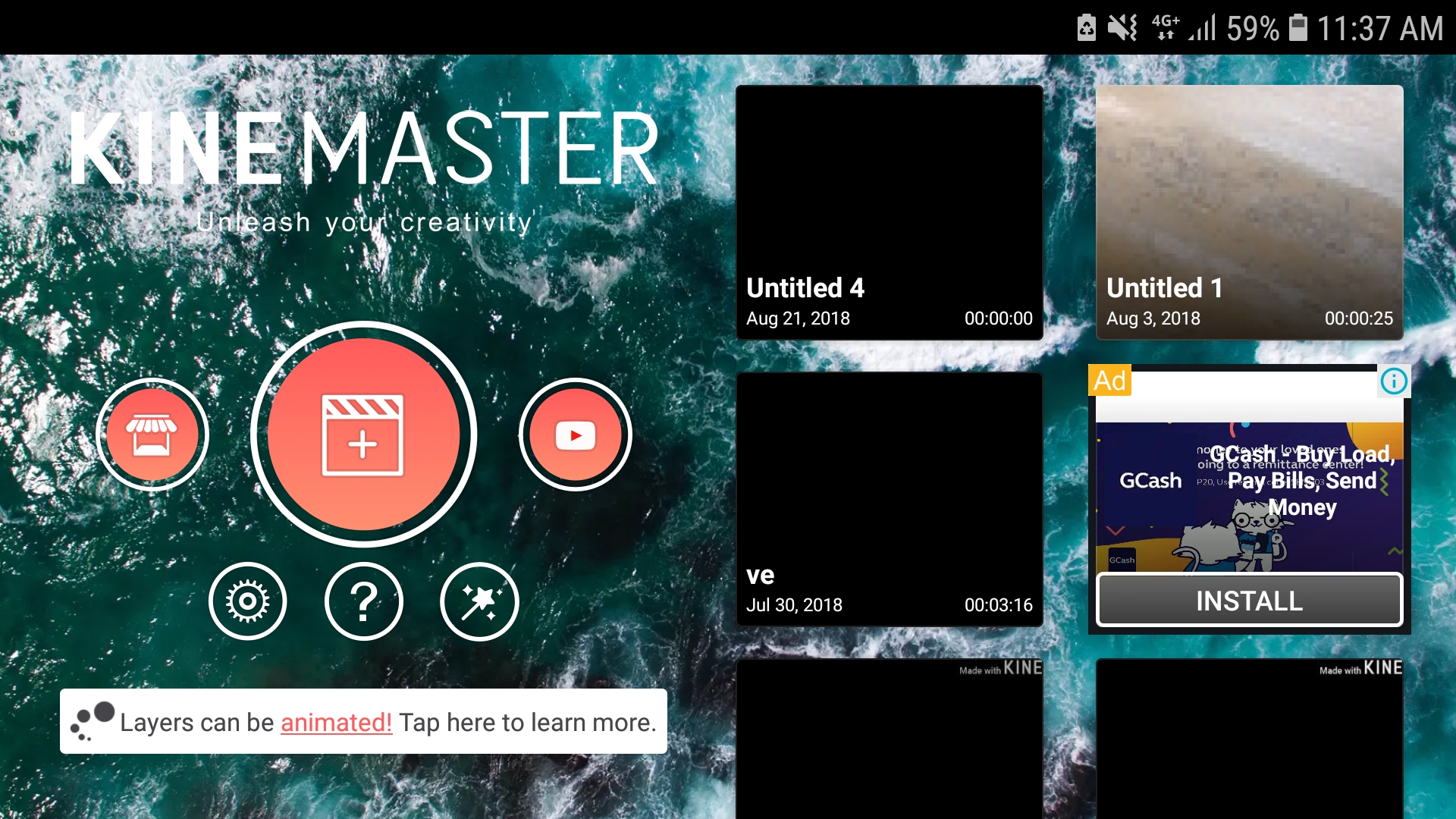
So when you start kinemaster you will see this

[IMAGE: https://cdn.steemitimages.com/DQmSbZpDqPVEZeHqRJBkQkEifHq2UMMoiAnGsRGyYWTGJVX/Screenshot_20180821-113716_KineMaster.jpg]

Simply click on the plus sign to get started

Adding media

So before we add media lets take a look at the panels

[IMAGE: https://cdn.steemitimages.com/DQmNu9w35mCB5wMfRzKp9U9tDgemkFVmbn4GdKA6Aa3X5Gy/1534823620151.png]
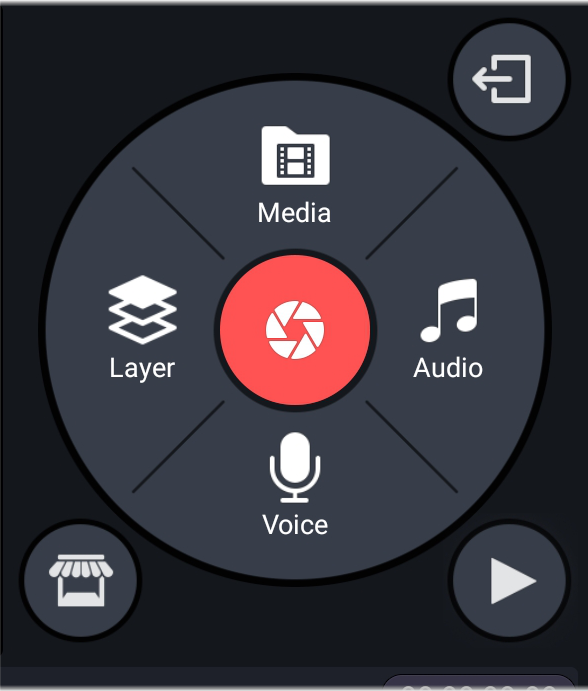
So here are the panels to add media simply press media and choose a picture/video that you want to edit

If you want to add another media just press it again and choose

But if you want to layer another media/text/effect/handwriting click the layer option and choose

Press audio if you want to add audio and voice if you want to add your own voice 

The play button on the lower right of the panels is to preview the video
[IMAGE: https://cdn.steemitimages.com/DQmfC8gA4phJzupH7XkxXWCBz48ATrWaoFSfqBQj55xg2HD/Screenshot_20180821-115238_KineMaster.jpg]

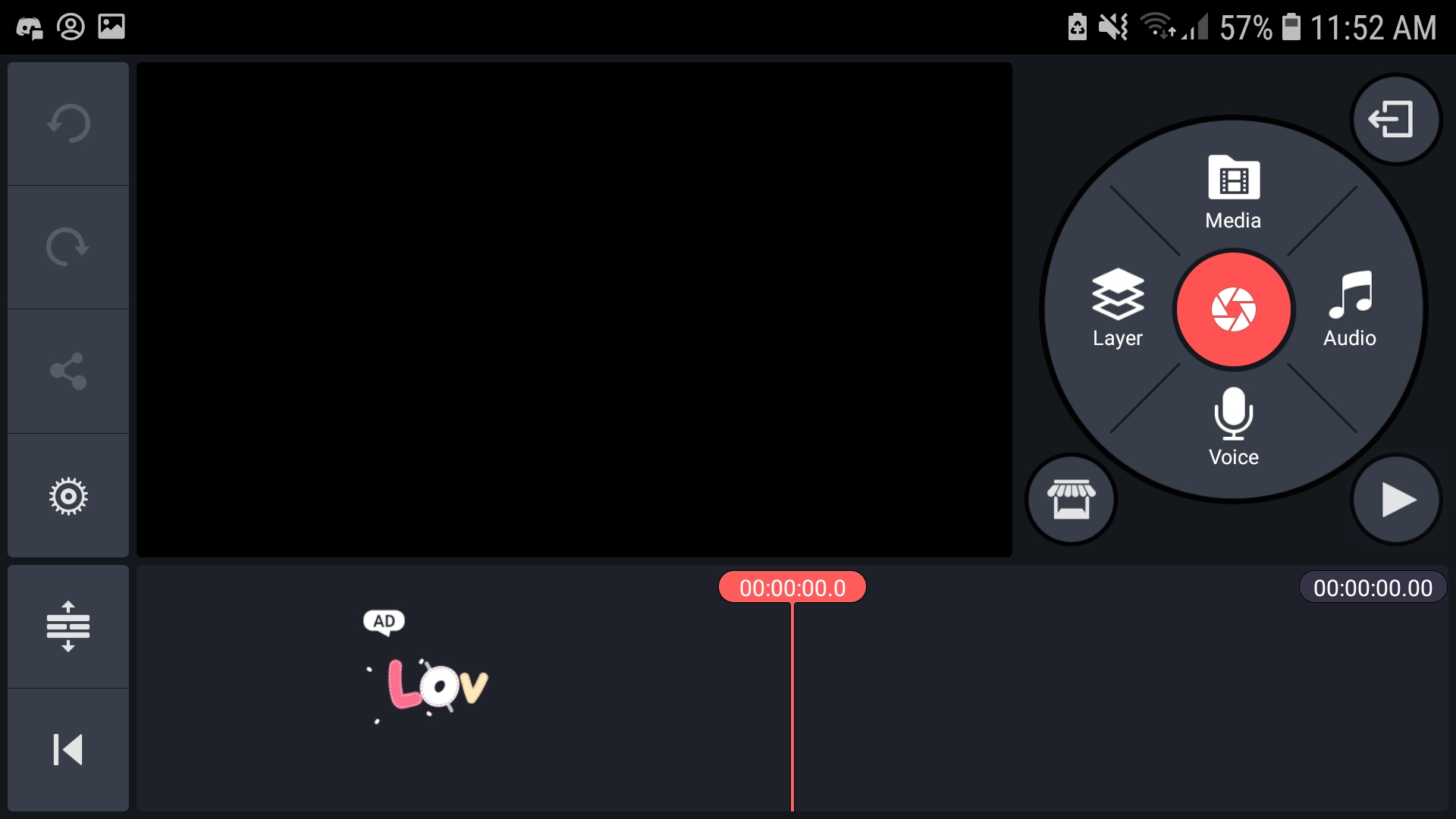
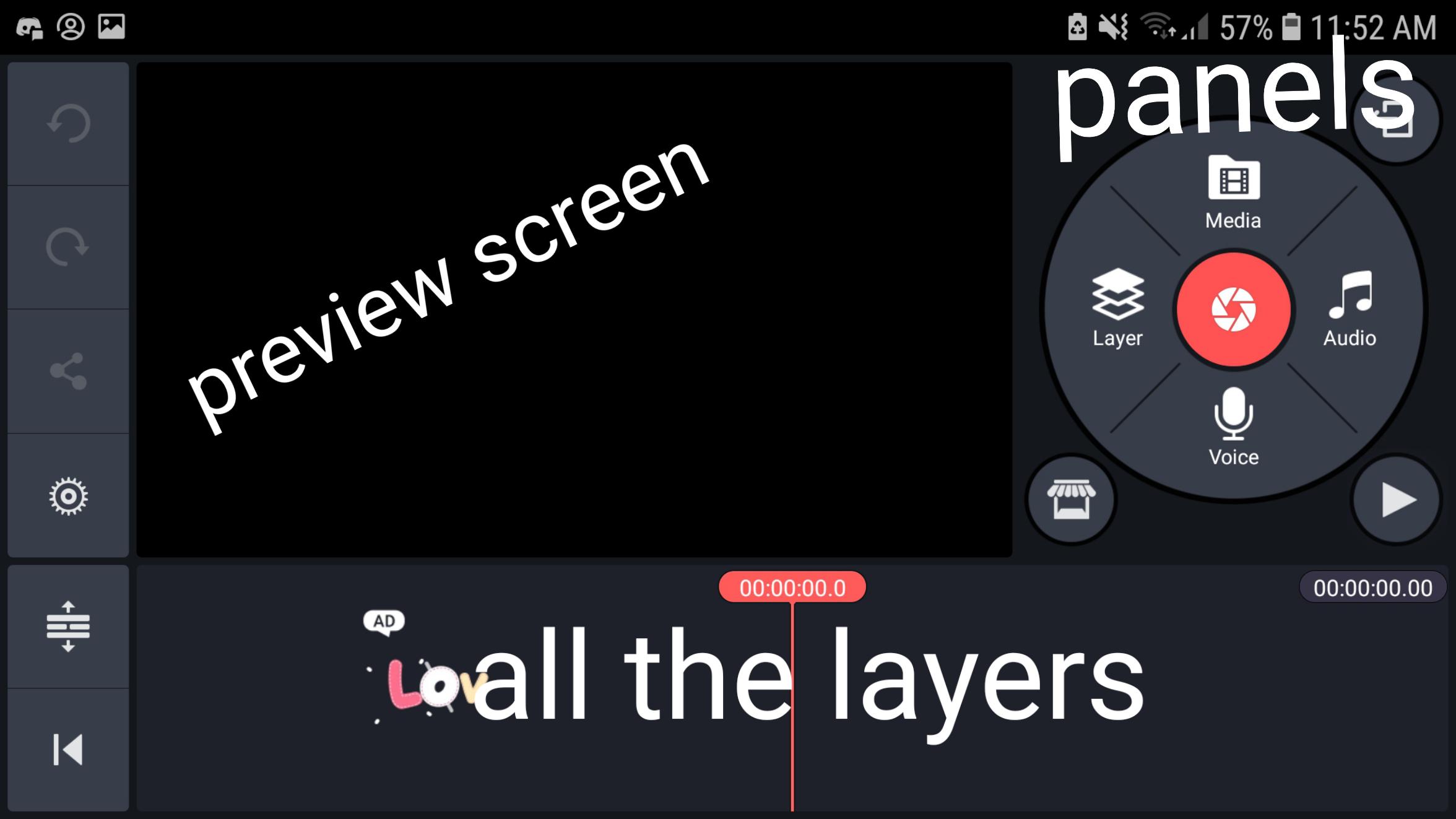
So here is the full view you will see

[IMAGE: https://cdn.steemitimages.com/DQmbby4j8UYWtZT9Ugj7KDZY5eR8joWB159UkhU8xBtaASQ/1534824145544.jpg]
CUTTING/TRIMMING

Once you added your vid, at the lower part of your screen you will see the vid and the length of the vid (you can also zoom in and out) you can select the vid and drag your playhead to a specific time then you can trim left trim right split or add freeze frame

There are a lot more features and i can't put every detail here so i encourage you all to download and give it a try

Ps. As far as im aware its for android only

TAGS: [ #video ] [ #edit ] [ #editor ] [ #editing ] [ #kinemaster ]

Replies

@steemitboard | Sept. 2, 2018, 11:26 p.m. | Votes: 0 | [ VOTE ]

Congratulations @xomegax! You have completed the following achievement on Steemit and have been rewarded with new badge(s) :

[IMAGE: https://steemitimages.com/70x80/http://steemitboard.com/notifications/votes.png] Award for the number of upvotes

Click on the badge to view your Board of Honor.
If you no longer want to receive notifications, reply to this comment with the word STOP

> Do you like SteemitBoard's project? Then Vote for its witness and get one more award!

@one-step1 | Sept. 5, 2018, 5:04 a.m. | Votes: 0 | [ VOTE ]

@xomegax
You are absolutely right, you have given very good information about kineMaster.

@steemitboard | Sept. 12, 2018, 10:46 a.m. | Votes: 0 | [ VOTE ]

Congratulations @xomegax! You have completed the following achievement on the Steem blockchain and have been rewarded with new badge(s) :

[IMAGE: https://steemitimages.com/70x80/http://steemitboard.com/notifications/votes.png] Award for the number of upvotes

Click on the badge to view your Board of Honor.
If you no longer want to receive notifications, reply to this comment with the word STOP

Do not miss the last post from @steemitboard:

SteemitBoard - Witness Update

> Support SteemitBoard's project! Vote for its witness and get one more award!

@steemitboard | Sept. 22, 2018, 1:36 p.m. | Votes: 0 | [ VOTE ]

Congratulations @xomegax! You have completed the following achievement on the Steem blockchain and have been rewarded with new badge(s) :

[IMAGE: https://steemitimages.com/70x80/http://steemitboard.com/notifications/votes.png] Award for the number of upvotes

Click on the badge to view your Board of Honor.
If you no longer want to receive notifications, reply to this comment with the word STOP

> Support SteemitBoard's project! Vote for its witness and get one more award!

@steemitboard | Oct. 26, 2018, 3:38 a.m. | Votes: 0 | [ VOTE ]

Congratulations @xomegax! You have completed the following achievement on the Steem blockchain and have been rewarded with new badge(s) :

https://steemitimages.com/60x70/http://steemitboard.com/@xomegax/votes.png?201810251527You made more than 1250 upvotes. Your next target is to reach 1500 upvotes.

Click here to view your Board of Honor
If you no longer want to receive notifications, reply to this comment with the word STOP

Do not miss the last post from @steemitboard:

SteemitBoard notifications improved

> Support SteemitBoard's project! Vote for its witness and get one more award!

@steemitboard | Nov. 13, 2018, 5:41 a.m. | Votes: 0 | [ VOTE ]

Congratulations @xomegax! You have completed the following achievement on the Steem blockchain and have been rewarded with new badge(s) :

https://steemitimages.com/60x70/http://steemitboard.com/@xomegax/votes.png?201811130301You made more than 1500 upvotes. Your next target is to reach 1750 upvotes.

Click here to view your Board of Honor
If you no longer want to receive notifications, reply to this comment with the word STOP

Do not miss the last post from @steemitboard:

SteemFest3 and SteemitBoard - Meet the Steemians Contest

> Support SteemitBoard's project! Vote for its witness and get one more award!

@steemitboard | Nov. 29, 2018, 9:50 a.m. | Votes: 0 | [ VOTE ]

Congratulations @xomegax! You have completed the following achievement on the Steem blockchain and have been rewarded with new badge(s) :

https://steemitimages.com/60x70/http://steemitboard.com/@xomegax/votes.png?201811290854You made more than 1750 upvotes. Your next target is to reach 2000 upvotes.

Click here to view your Board of Honor
If you no longer want to receive notifications, reply to this comment with the word STOP

> Support SteemitBoard's project! Vote for its witness and get one more award!

[ BACK TO TRENDING ] [ BACK TO MENU ]
CMD>